Paylater - API Checkout
About Paylater - API Checkout
This API uses by Merchants to requests payment to NICEPAY for the Paylater payment method using Checkout API.
Process Flow
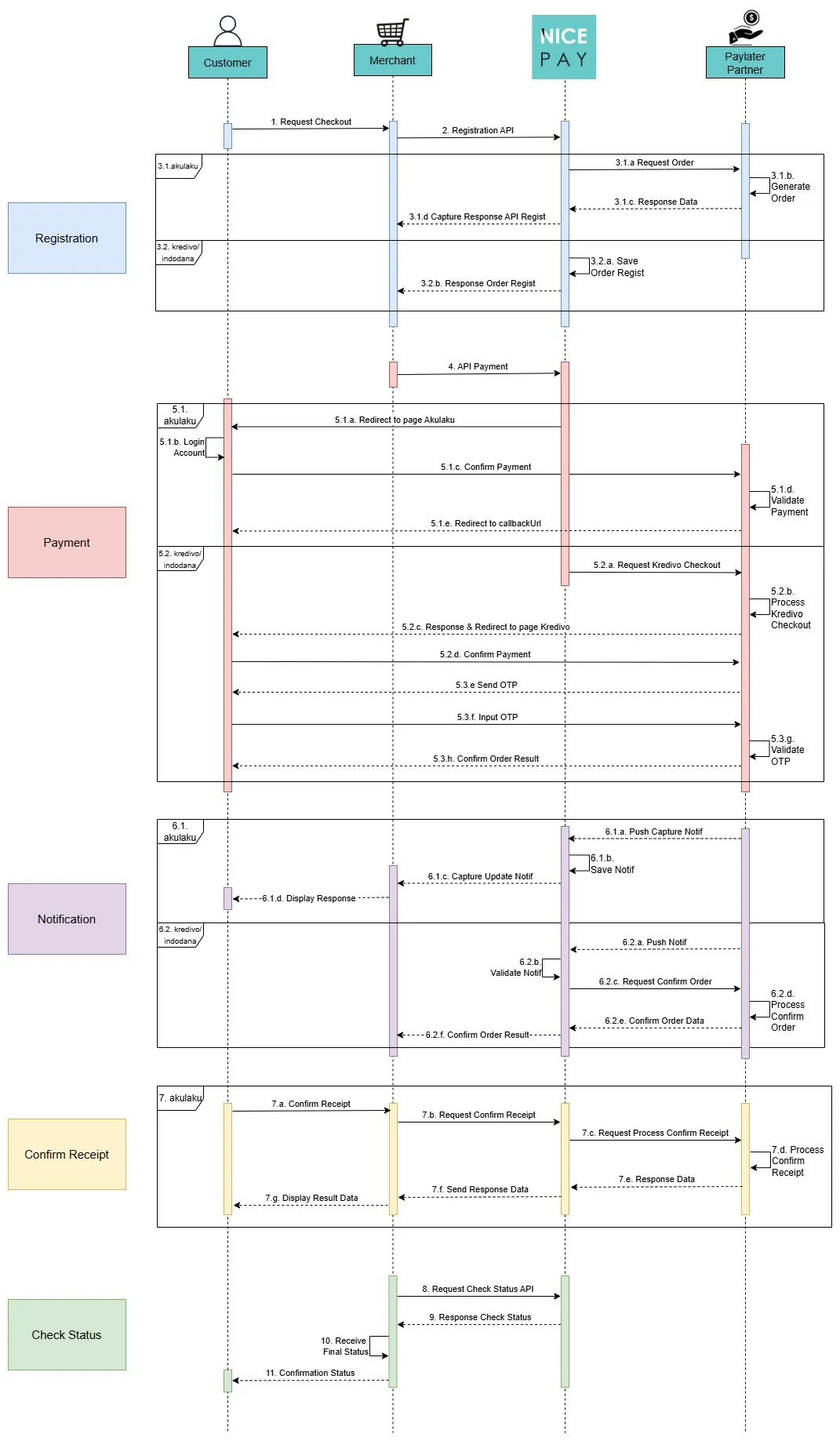
Description of payment procedures with Paylater:
- The Customer requests checkout to the Merchant.
- The Merchant sends Registration API to NICEPAY.
- In the Registration section:
- If using Akulaku:
- NICEPAY will request the order to Akulaku as the Paylater Partner.
- Akulaku generates order.
- Akulaku sends the data response to NICEPAY.
- NICEPAY will send the capture of the API Regist response to the Merchant.
- If using Kredivo/Indodana:
- NICEPAY will save the Order Regist.
- NICEPAY will send the Order Regist response.
- The Merchant sends the Payment API to NICEPAY.
- Then in the Payment section:
- If using Akulaku:
- NICEPAY will redirect the Customer to the Akulaku page.
- The Customer login to the account.
- The Customer confirms the payment to Akulaku as the Paylater Partner.
- Akulaku validates the payment.
- Akulaku redirects the Customer using callbackUrl.
- If using Kredivo/Indodana:
- NICEPAY requests checkout to Paylater Partner.
- Paylater Partner proceeds with the checkout process.
- Paylater Partner sends the response and redirects to the Paylater Partner page.
- The Customer confirms the payment to Paylater Partner.
- Paylater Partner sends OTP to the Customer.
- The Customer inputs the OTP to the Paylater Partner.
- Paylater Partner validates the OTP.
- Paylater Partner confirms the result order to the Customer.
- In the Notification section:
- If using Akulaku:
- Akulaku as Paylater Partner sends push capture notification to NICEPAY.
- NICEPAY saves the notification.
- NICEPAY sends the capture of the update notification to the Merchant.
- The Merchant displays the response to the Customer.
- If using Kredivo/Indodana:
- Paylater Partner sends the push notification to NICEPAY.
- NICEPAY validates the received notification.
- NICEPAY requests order confirmation.
- Paylater Partner confirms the order process.
- Paylater Partner sends order confirmation data to NICEPAY.
- NICEPAY sends order confirmation result.
- If Paylater Partner used is Akulaku, the Customer can confirms the payment receipt.
- The Customer sends payment receipt confirmation to the Merchant.
- The Merchant requests payment receipt confirmation to NICEPAY.
- NICEPAY requests the process of payment receipt confirmation to Akulaku.
- Akulaku proceeds the payment receipt confirmation process.
- Akulaku sends the data response to NICEPAY.
- NICEPAY sends the data response to the Merchant.
- The Merchant displays data results to the Customer.
- The Merchant sends the request for transaction checking status by using Status API to NICEPAY.
- NICEPAY sends the response of transaction checking status to the Merchant.
- The Merchant receives the final status.
- The Merchant sends the status confirmation to the Customer.
NICEPAY Secure Payment Page
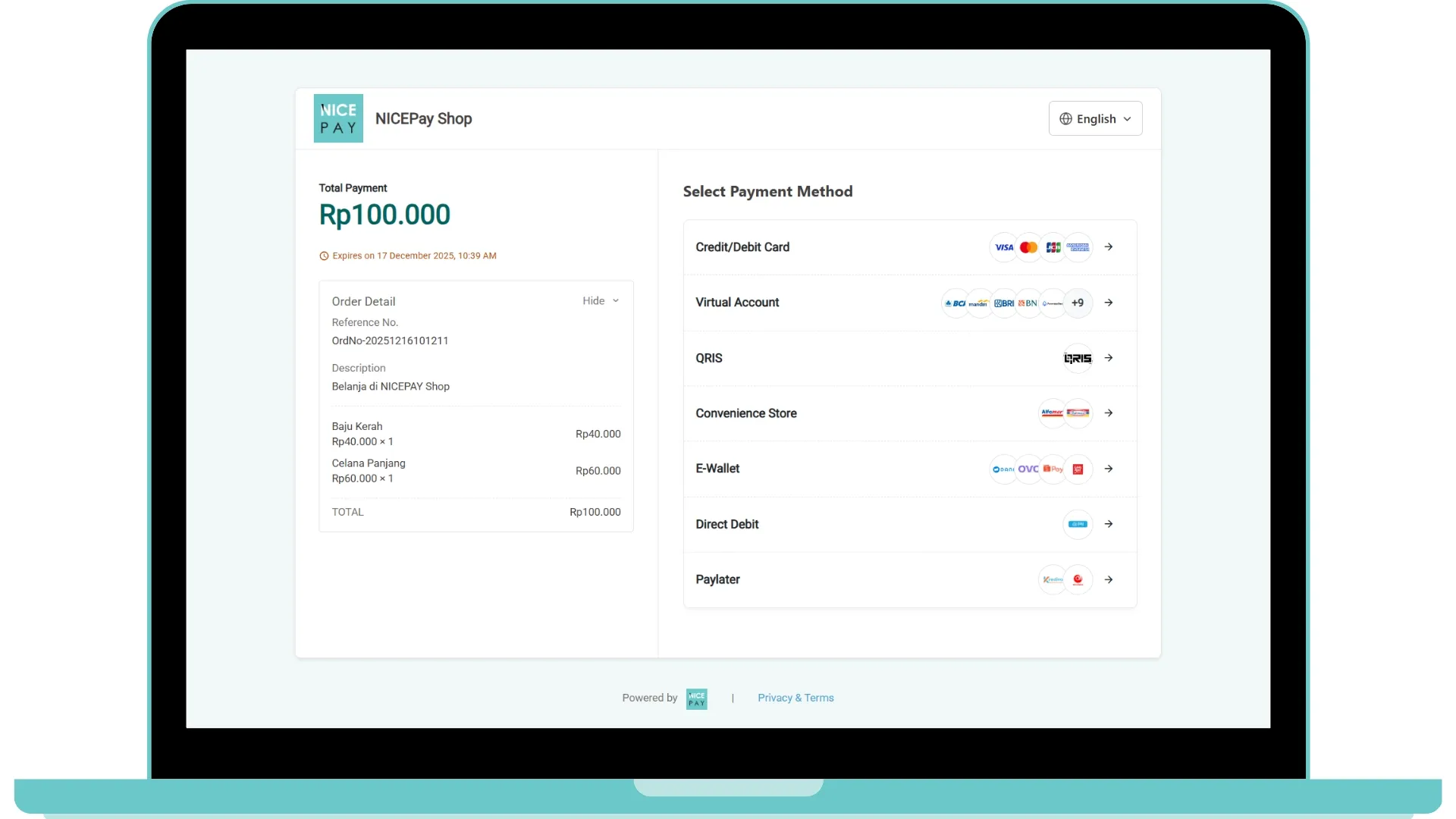
The image above is a Checkout payment sample with the Paylater method using NICEPAY Secure Payment Page.
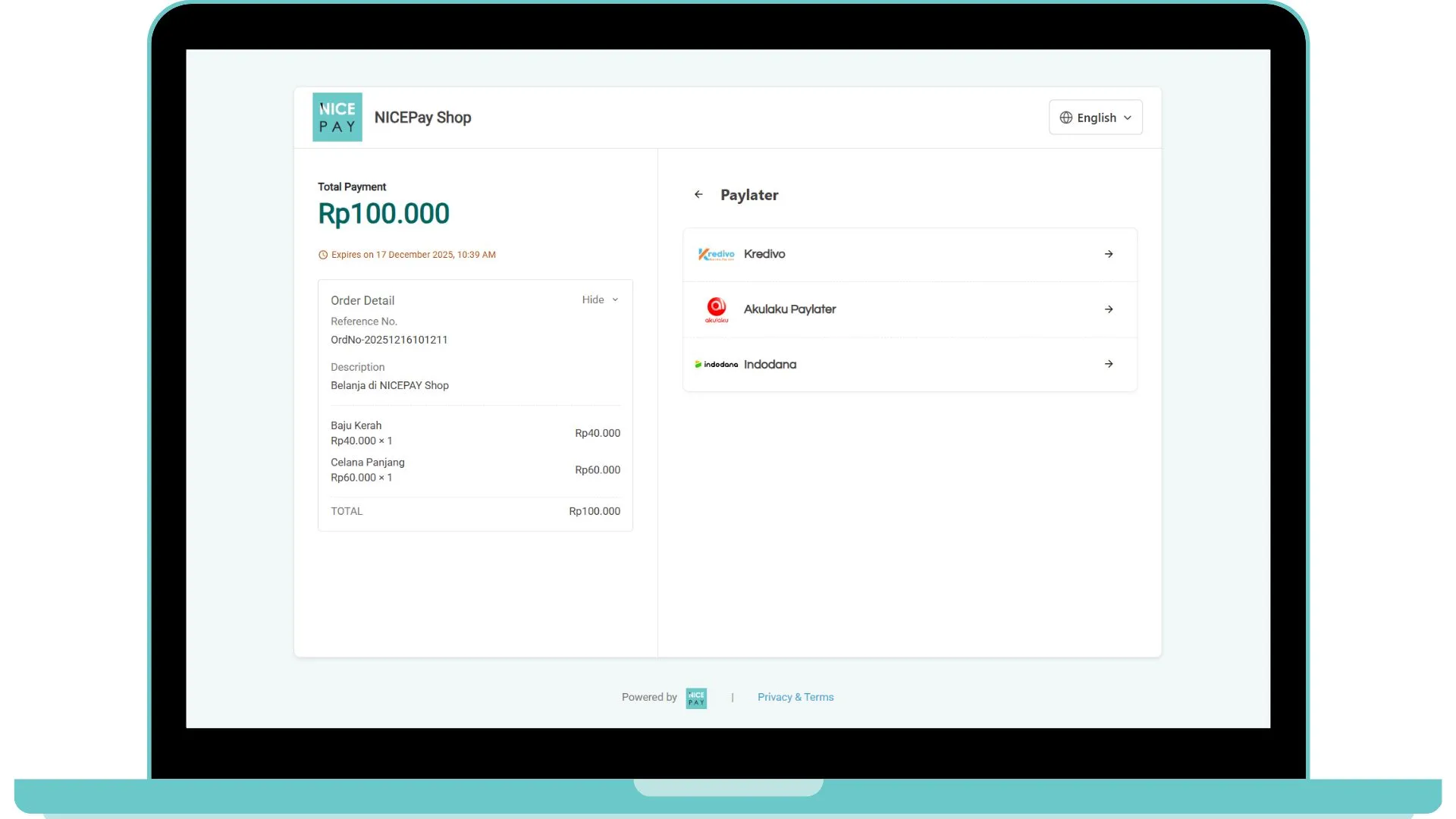
After the process of payment registration request completes, you can continue the transaction process until settlement by following the guidelines in Paylater Payment Guide.
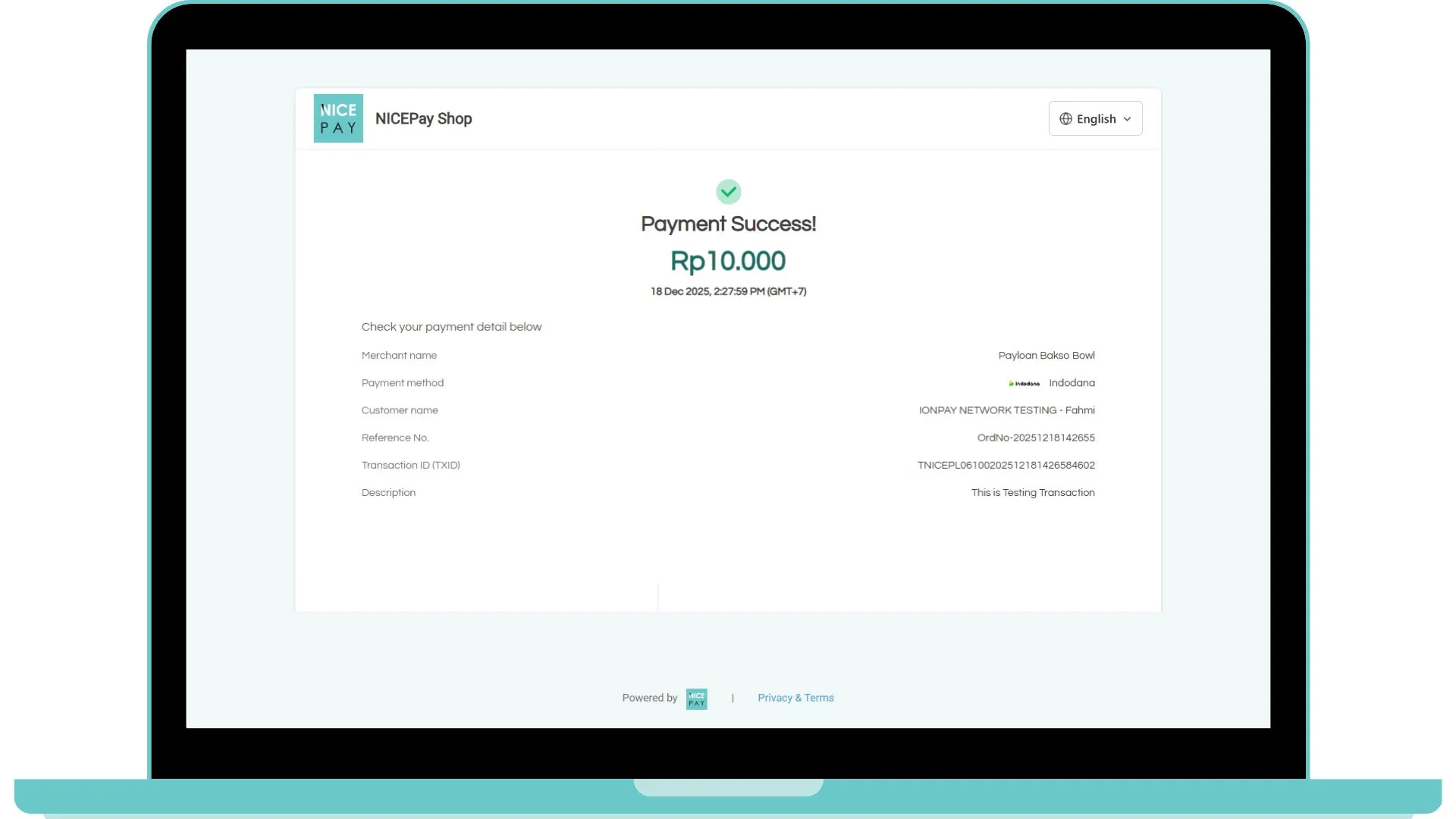
API Checkout Transaction Payment
API URL | /nicepay/redirect/v2/payment |
|---|---|
Request Method | Redirect-GET |
Header | Content-Type: application/Form-UrlEncoded |
Request Parameter for Paylater - API Checkout (CallbackUrl)
The following are Request Parameter lists for Paylater Payment API on Checkout API.
Note for Paylater, please give a warning message for the Customer to open by mobile devices for the Customer better user experience.
Parameter | Type | Size | Description | Remark |
|---|---|---|---|---|
paymentURL Required | ANS | 14 | Payment URL | https://dev.nicepay.co.id/nicepay/redirect/v2/payment |
tXid Required | AN | 30 | Transaction ID | PAYLOANTES00202212201645434449 |
Response Parameter for Paylater - API Checkout (CallbackUrl)
Note: Response parameter will be sent through callbackUrl with Content-type: application/json and method: POST Parameter.
Parameter | Type | Size | Description | Example / Remark |
|---|---|---|---|---|
resultCd | N | 4 | 0000 | |
resultMsg | AN | 255 | Result Message: Error Code | SUCCESS |
tXid | AN | 30 | Transaction ID | PAYLOANTES00202212201645434449 When Success |
referenceNo | ANS | 40 | Order Number | ORD20221220161200 When Success |
payMethod E-Wallet, Paylater | N | 2 | 06 When Success | |
amt | N | 12 | Transaction Amount | 10000 When Success |
currency E-Wallet, Paylater | A | 3 | Currency | IDR When Success |
goodsNm E-Wallet, Paylater | AN | 100 | Goods Name | John+Doe When Success |
billingNm E-Wallet, Paylater | A | 100 | Billing Name | John+Doe When Success |
transDt | N | 8 | Transaction Date (YYYYMMDD) | 20221220 When Success |
transTm | N | 6 | Transaction Time (HH24MISS) | 164543 When Success |
description | AN | 100 | Transaction Description | Test+Transaction+Nicepay When Success |
authNo Only CC | N | 10 | Approval Number | When Success |
issuBankCd Only CC | A | 4 | When Success | |
acquBankCd Only CC | A | 4 | When Success | |
issuBankNm | A | 255 | Issuing Bank Name | When Success |
acquBankNm | A | 255 | Acquiring Bank Name | When Success |
cardNo Only CC | ANS | 20 | Card Number with Masking | When Success |
recurringToken Only CC (Additional) | AN | 255 | Recurring Token | When Success |
preauthToken | AN | 255 | Pre-Auth Token | null When Success |
ccTransType | AN | 2 | Credit Card Transaction Type: 1: Normal 2: Recurring 3: Pre-Auth 4: Capture | When Success |
mitraCd Direct Debit, E-Wallet, Paylater | A | 4 | KDVI When Success | |
receiptCode | ANS | 20 | Authorization Number | When Success |
mRefNo | AN | 18 | Reference Number | When Success |
cardExpYymm | N | 4 | Card Expiry (YYMM) | When Success |
instmntType | N | 2 | When Success | |
instmntMon | N | 2 | Installment Month 1: 1 Month/Full Payment, if instmntType: null/1 3: 3 Months 6: 6 Months 12: 12 Months | When Success |
timeStamp | N | 14 | API Request Timestamp | When Success |
merchantToken | AN | 255 | Merchant Token | When Success |
Sample Parameter for Paylater - API Checkout (CallbackUrl)
On the payment in Checkout, the response from the request that get hit is the Callback URL.
Request Parameter
curl -X GET "https://www.merchant.com/callbackUrl?resultCd=0000&resultMsg=SUCCESS&tXid=PAYLOANTES00202212201645434449&referenceNo=ORD20221220161200&payMethod=06&amt=10000&transDt=20221220&transTm=164543&description=Test+Transaction+Nicepay&authNo=&issuBankCd=&acquBankCd=&cardNo=&receiptCode=&mitraCd=KDVI&recurringToken=&preauthToken=¤cy=IDR&goodsNm=John+Doe&billingNm=John+Doe&ccTransType=&mRefNo=&instmntType=&instmntMon=&cardExpYymm=&issuBankNm=&acquBankNm=&timeStamp=&merchantToken="Callback Parameter
resultCd=0000
resultMsg=SUCCESS
tXid=PAYLOANTES00202212201645434449
referenceNo=ORD20221220161200
payMethod=06
amt=10000
transDt=20221220
transTm=164543
description=Test+Transaction+Nicepay
authNo=
issuBankCd=
acquBankCd=
cardNo=
receiptCode=
mitraCd=KDVI
recurringToken=
preauthToken=
currency=IDR
goodsNm=John+Doe
billingNm=John+Doe
ccTransType=
mRefNo=
instmntType=
instmntMon=
cardExpYymm=
issuBankNm=
acquBankNm=
timeStamp=
merchantToken=
Callback Handling API Checkout Payment
When Your Callback already received callbackUrl, we recommended the Merchant to do the status verification using the Status Inquiry - API Checkout.
Callback Handling is very important to minimize the Fraud act, we highly recommend the Merchant to do the verification using Callback parameter.

https://merchant.com/api/callBackUrl