Paylater Payment Flow
2 min
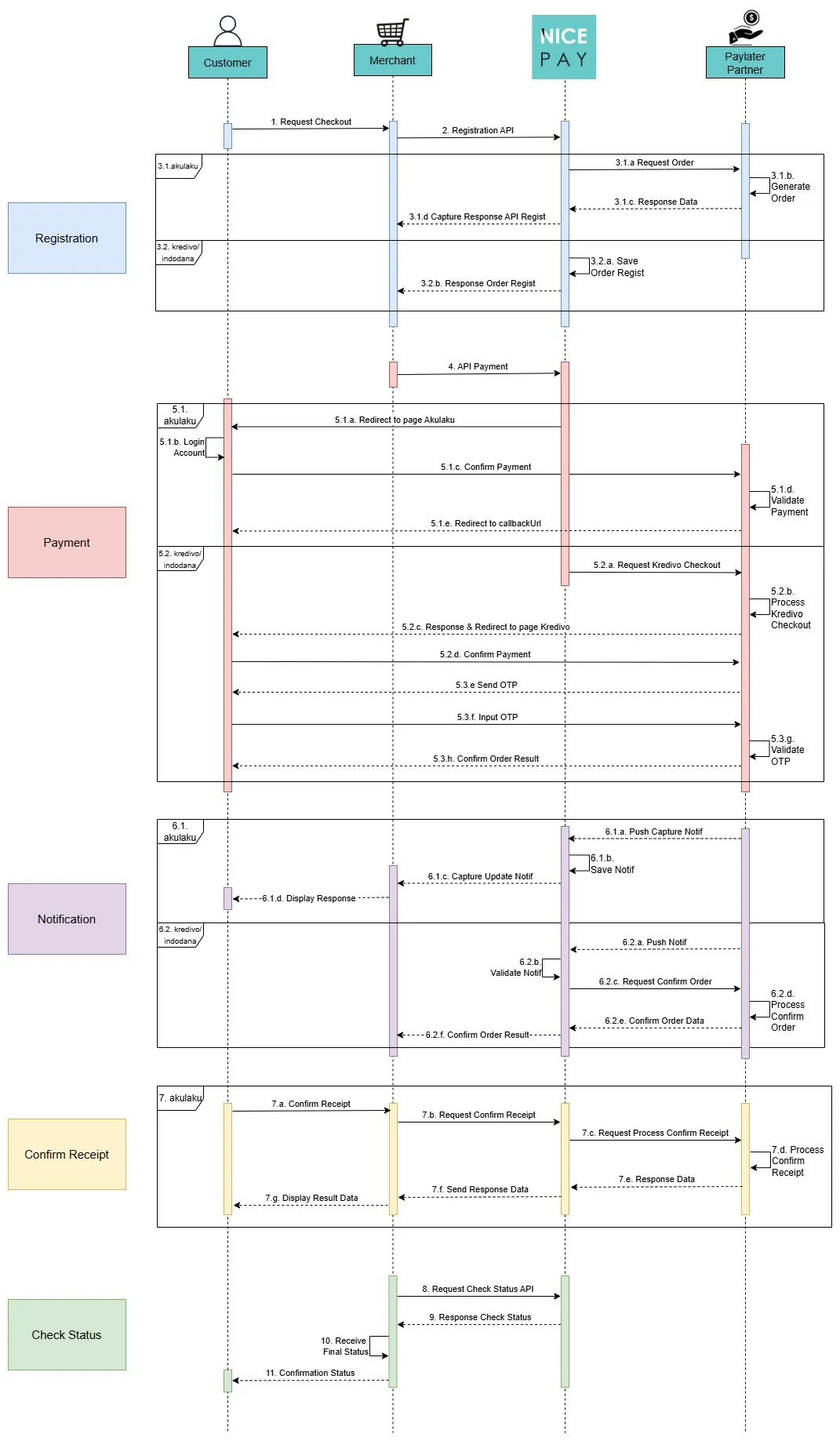
Paylater Payment Flow
Description of payment procedures with Paylater:
- The Customer requests checkout to the Merchant.
- The Merchant sends Registration API to NICEPAY.
- In the Registration section:
- If using Akulaku:
- NICEPAY will request the order to Akulaku as the Paylater Partner.
- Akulaku generates order.
- Akulaku send the data response to NICEPAY.
- NICEPAY will send the capture of the API Regist response to the Merchant.
- If using Kredivo/Indodana:
- NICEPAY will save the Order Regist.
- NICEPAY will send the Order Regist response.
- The Merchant sends the Payment API to NICEPAY.
- Then in the Payment section:
- If using Akulaku:
- NICEPAY will redirect the Customer to the Akulaku page.
- The Customer login to the account.
- The Customer confirms the payment to Akulaku as the Paylater Partner.
- Akulaku validates the payment.
- Akulaku redirects the Customer using callbackUrl.
- If using Kredivo/Indodana:
- NICEPAY requests checkout to Paylater Partner.
- Paylater Partner proceeds the checkout process.
- Paylater Partner sends the response and redirects to the Paylater Partner page.
- The Customer confirms the payment to Paylater Partner.
- Paylater Partner sends OTP to the Customer.
- The Customer inputs the OTP to the Paylater Partner.
- Paylater Partner validates the OTP.
- Paylater Partner confirms the result order to the Customer.
- In the Notification section:
- If using Akulaku:
- Akulaku as Paylater Partner sends push capture notification to NICEPAY.
- NICEPAY saves the notification.
- NICEPAY sends the capture of update notification to the Merchant.
- The Merchant displays the response to the Customer.
- If using Kredivo/Indodana:
- Paylater Partner sends the push notification to NICEPAY.
- NICEPAY validates the received notification.
- NICEPAY requests order confirmation.
- Paylater Partner confirms the order process .
- Paylater Partner sends order confirmation data to NICEPAY.
- NICEPAY sends order confirmation result.
- If Paylater Partner used is Akulaku, the Customer can confirms the payment receipt.
- The Customer sends payment receipt confirmation to the Merchant.
- The Merchant requests payment receipt confirmation to NICEPAY.
- NICEPAY requests the process of payment receipt confirmation to Akulaku.
- Akulaku proceeds the payment receipt confirmation process.
- Akulaku sends the data response to NICEPAY.
- NICEPAY sends the data response to the Merchant.
- The Merchant displays data result to the Customer.
- The Merchant sends the request for transaction checking status by using Status API to NICEPAY.
- NICEPAY sends the response of transaction checking status to the Merchant.
- The Merchant receives the final status.
- The Merchant sends the status confirmation to the Customer.
See also
Visit the Paylater Feature page to find out the transaction features on the Paylater.
Visit the Paylater Integration & Testing page to find out how to perform integration and testing of the NICEPAY Paylater system.
Visit the Paylater Glossary page to find out the particular term used on Paylater.
Visit the Paylater FAQ page if you want to find out frequently asked questions related to Paylater.