CVS Payment Flow
2 min
The following is the payment flow through Convenience Stores for Indomaret & Alfa Group.
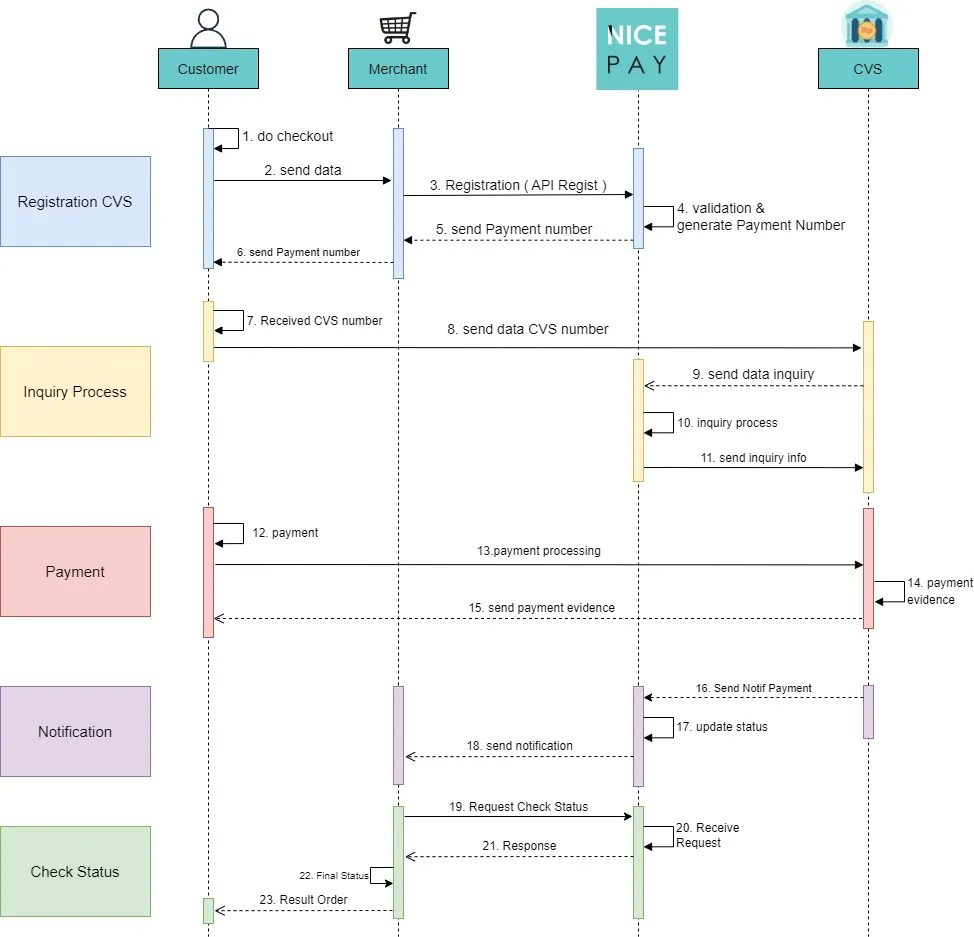
CVS Payment Flow
Description of registration steps on CVS:
- The Customer does checkout.
- The Customer sends checkout data to the Merchant.
- The Merchant registers checkout via API Registration with NICEPAY.
- NICEPAY validates and generates the payment number.
- NICEPAY sends the number that needs to be paid to the Merchant.
- The Merchant sends the number that needs to be paid to the Customer.
- The Customer receives CVS payment number.
- The Customer sends CVS payment number to CVS.
- CVS sends inquiry data to NICEPAY.
- NICEPAY proceed with the inquiry request.
- NICEPAY sends inquiry information to CVS.
- The Customer makes a payment.
- The Customer proceeds with a payment at CVS.
- CVS proceed with the proof of payment.
- CVS sends payment proof to the Customer.
- CVS sends a notification to NICEPAY.
- NICEPAY updated the status.
- NICEPAY sends the notifications to Merchants.
- The Merchant submits a status check to NICEPAY.
- NICEPAY accepts applications.
- NICEPAY sends a response to the Merchant.
- The Merchant receives the final status.
- The Merchant sends the results of the order to the Customer.
See also
Visit the CVS Feature page to find out the transaction feature on the Convenience Store.
Visit the CVS Integration & Testing page to find out how to perform integration and testing of the NICEPAY Convenience Store system.
Visit the CVS Glossary page to find out the particular term used on Convenience Store.
Visit the CVS FAQ page if you want to find out frequently asked questions related to Convenience Store.