Credential Management
Credential Management
Credential Management menu used by the Merchant which already have an IMID or Client ID to view the credential information when using NICEPAY API. Currently, NICEPAY provides a feature to assists Merchant in monitoring the credential status when using SNAP based NICEPAY API for E-Wallet payment method.
SNAP Credential Management
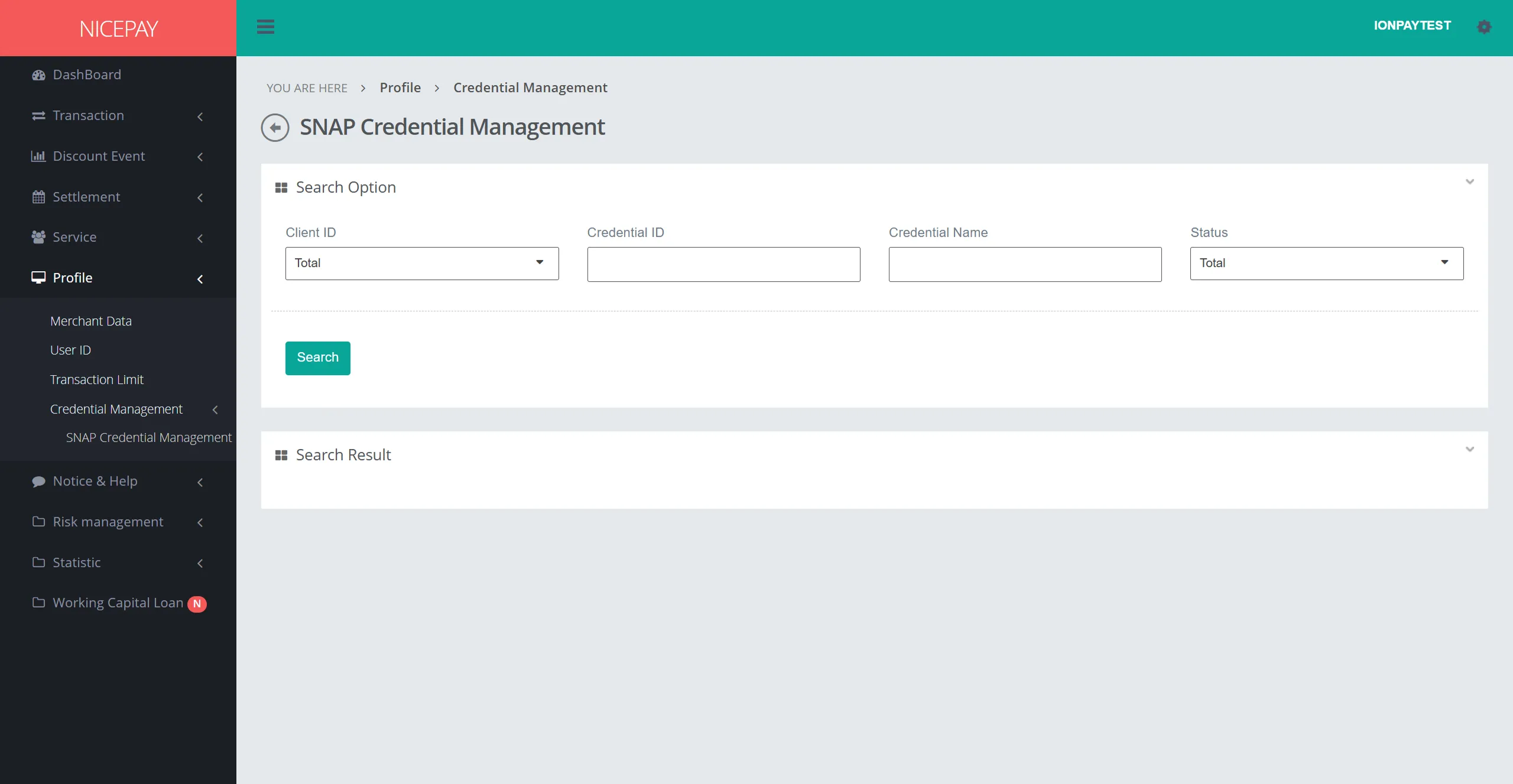
SNAP Credential Management sub-menu contains the Merchant's credential information when using the SNAP-based NICEPAY API. Through this sub-menu, Merchant can check the status of their credential access. Additionally, Merchant can check and monitor the status of multiple credentials simultaneously.
This page is divided into 2 sections: Search Option andSearch Result. The Search Option section is a form section used to input data search criteria. The Search Result section to view the search results based on the specified criteria.
The form in the Search Option section consist of:
Name | Description | Remark |
|---|---|---|
Client ID | Client ID Owned by Merchant. | Client ID = Merchant ID / IMid |
Credential ID | Credential ID Owned by Merchant. | Credential ID = iMid - createDt -UUID.randomUUID Example : IONPAYTEST-20241111091930-c94134c1 |
Credential Name | Merchant's Credential Name. | IONPAYTEST (Main Credential) |
Status | Merchant's Credential Status. |
|
Search | A button used to process the keyword inputted keyword by the Merchant when searching for credential information . | Data search results will be displayed in the Search Result section. |
Field that available on this page form search result consists of:
Name | Description | Remark |
|---|---|---|
Brand Name | Brand Name Owned by Merchant. | NICEPAY |
Client ID | Client ID owned by Merchant. | Client ID = Merchant ID / IMid |
Credential ID | Merchant's Credential ID. | Credential ID = iMid - createDt -UUID.randomUUID Example: IONPAYTEST-20241111091930-c94134c1 |
Credential Name | Merchant's Credential Name. | IONPAYTEST (Main Credential) |
Partner ID | Merchant's Partner ID. | Partner ID = Merchant ID / IMid |
Registration Date | Merchant's Credential Created Time. | 07-02-2026 |
Last Update Date | Merchant's Credential Last Updated Time. | 07-02-2026 |
API Key | API Key. |
|
Status | Merchant's Credential Status. |
|
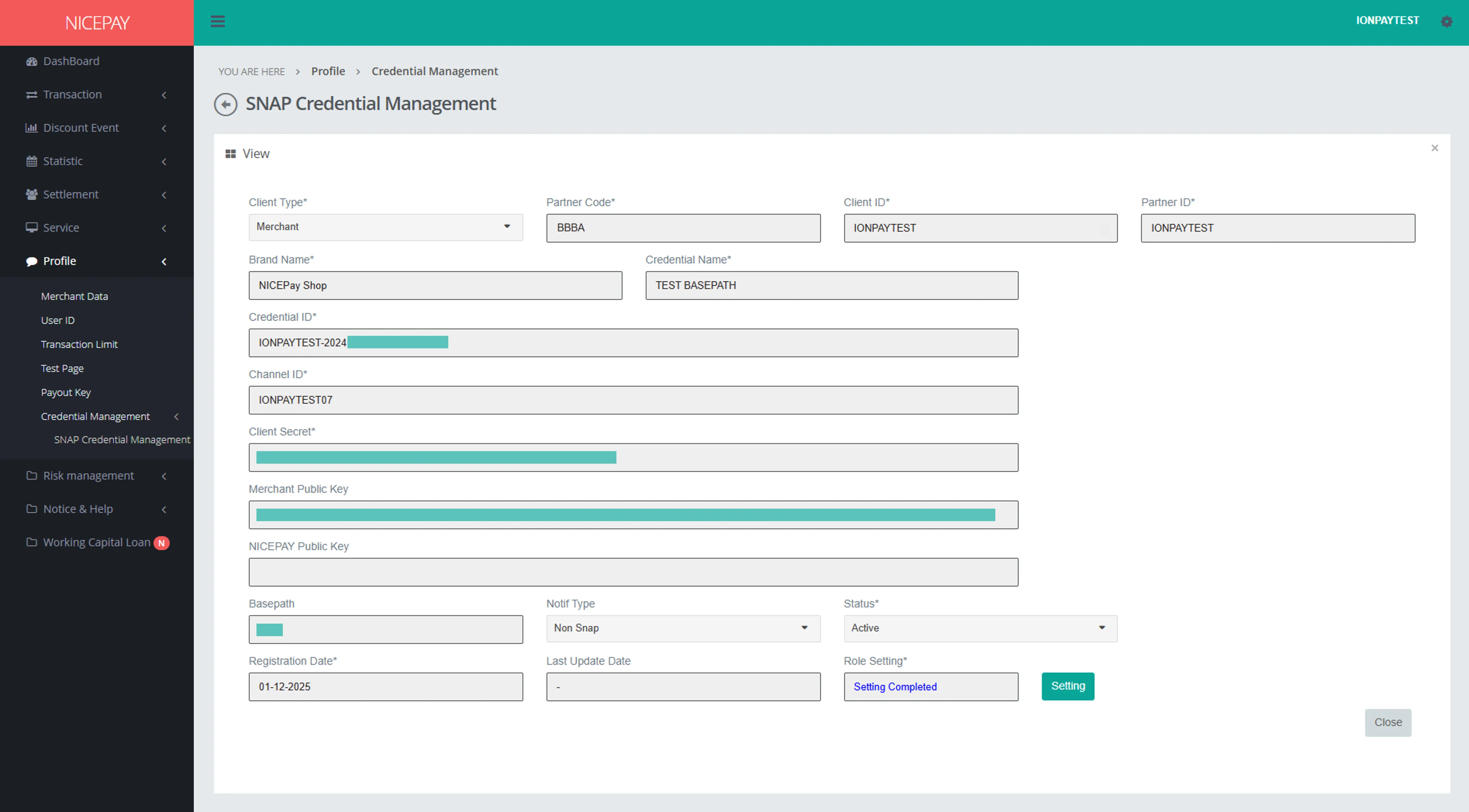
Credential Detail
Name | Description | Notes |
|---|---|---|
Client Type | NICEPAY Client Type. | Merchant |
Partner Code | NICEPAY Partner Code. | - |
Client ID | Client ID Owned by Merchant. | Client ID = Merchant ID / IMid |
Partner ID | Merchant's Partner ID. | Partner ID = Merchant ID / IMid |
Brand Name | Brand Name Owned by Merchant. | NICEPAY |
Credential ID | Merchant's Credential ID. | Credential ID = iMid - createDt -UUID.randomUUID Example: IONPAYTEST-20241111091930-c94134c1 |
Credential Name | Merchant's Credential Name. | IONPAYTEST (Main Credential) |
Channel ID | Credential Channel Unique Number. | IONPAYTEST01 |
Client Secret | Client Secret Key. | - |
External Public Key | Merchant Public Key. | - |
NICEPAY Public Key | To verify responses from NICEPAY and validate data signed securely by NICEPAY. | - |
Basepath | The URL path only required for NIVA & NICO processes. | Merchant must provide this path so NICEPAY can inquire about detailed transaction information. Please contact Integration Team to get further help. |
Notif Type | The notification type for the SNAP Transaction API. | Merchant can choose to use either the Non-SNAP or SNAP specification to obtain the latest transaction status. |
Status | Merchant 's Credential Status. |
|
Registration Date | Merchant's Credential Created Time. | 07-02-2026 |
Last Update Date | Merchant's Credential Last Updated Time. | 07-02-2026 |
Role Setting | Role Credential Detail Information. | - |
Setting | A button used to process the setting sets for the credential. | The setting of the credential will be set according to the created specification. |
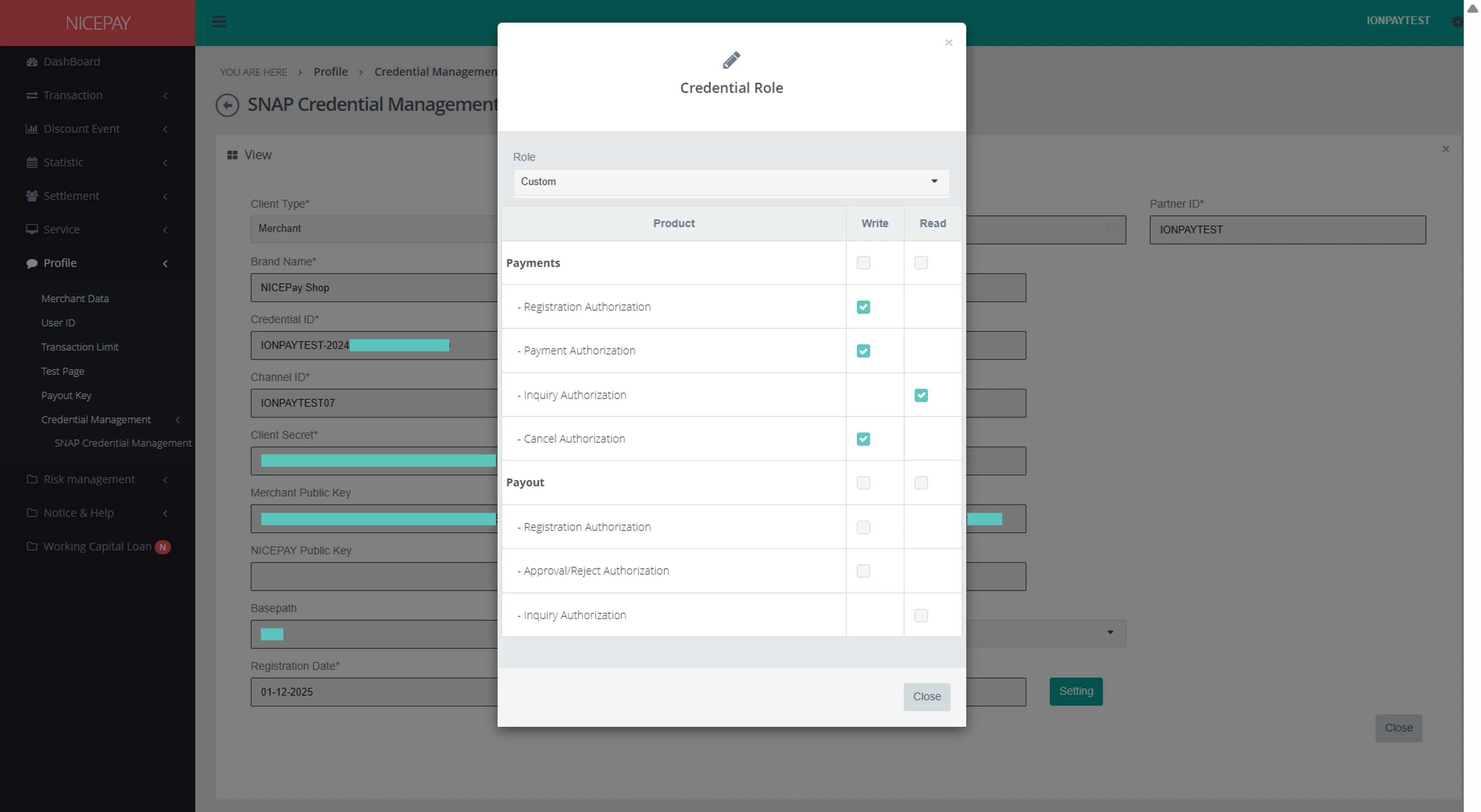
Setting Detail
Nama | Deskripsi | Keterangan |
|---|---|---|
Role | Credential access. | - |
Payment s | Credential role in the Payment s section. | - |
Payments Registration Authorization | Credential role in thee Payment s section to manage authorization during payment registration. | Write |
Payments Payment Authorization | Credential role in the Payment s section to manage authorization during payment. | Write |
Payments Inquiry Authorization | Credential role in the Payment s section to manage authorization when checking the payment status. | Read |
Payments Cancel Authorization | Credential role in the Payment s section to manage authorization during payment cancellation. | Write |
Payout | Credential role in the Payout section. | - |
Payout Registration Authorization | Credential role in the Payout section to manage authorization during payment registration. | Write |
Payout Approval/Reject Authorization | Credential role in the Payout section to manage authorization when approving/rejecting the Payout request. | Write |
Payout Inquiry Authorization | Credential role in the Payment s section to manage authorization when checking the Payout transaction status. | Write |
Tutorial
View Merchant's Credential Information
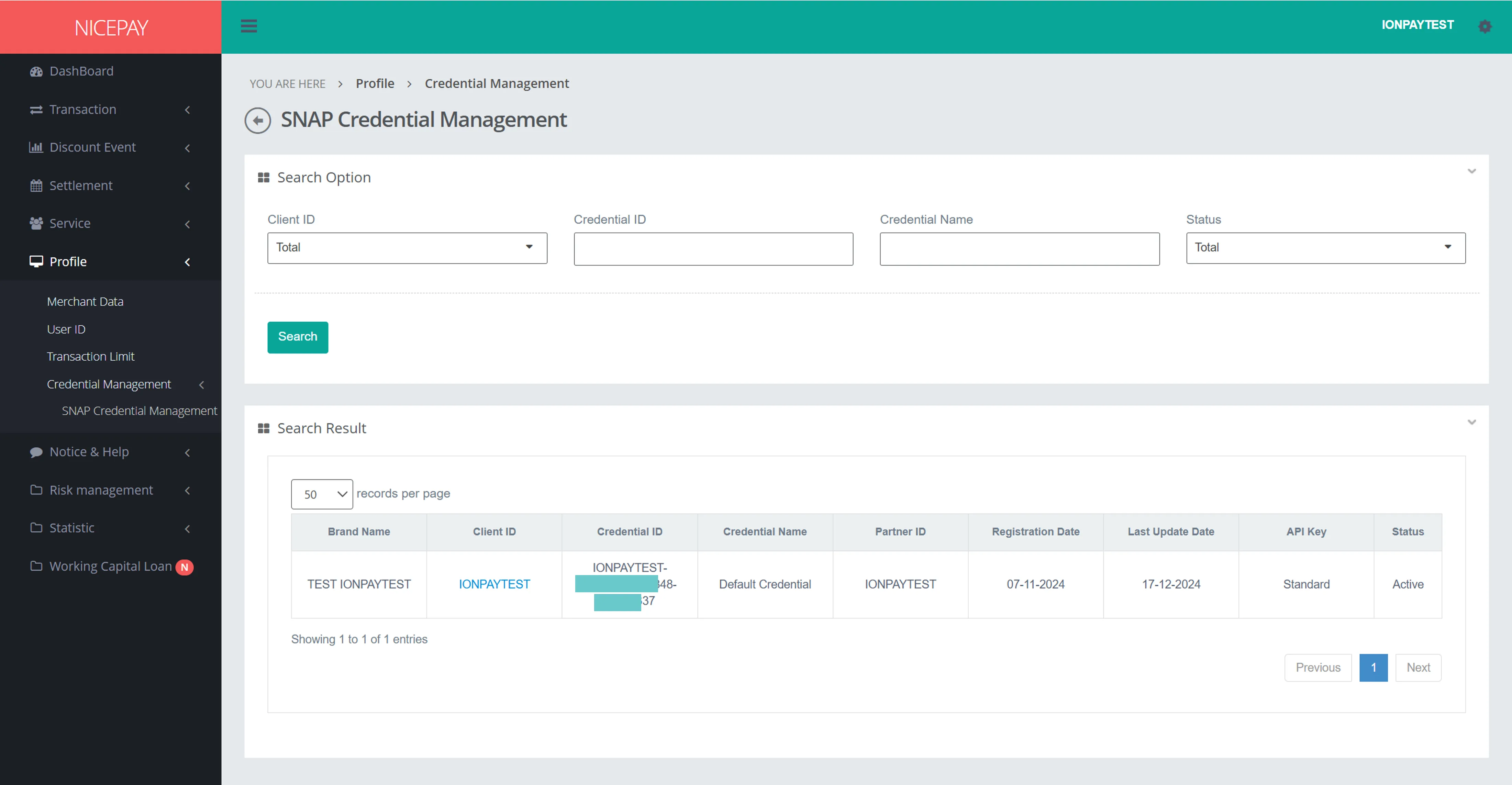
Here’s guidance to view Merchant's credential information.
- Open sidebar.
- Select the Profile menu.
- Select the Credential Management sub-menu, then click on the SNAP Credential Management.
- Input the search term in the Search Option section.
- Press the Search button to performs the data searching process.
- The credential data searched will appear in the Search Result section.
View Merchant's Credential Detail Information
Here’s guidance to view Merchant's credential detail information.
- Open sidebar.
- Select the Profile menu.
- Select the Credential Management sub-menu, then click on the SNAP Credential Management.
- Input the search term in the Search Option section.
- Press the Search button to performs the data searching process.
- Select the Client ID on a data row.
- The chosen detail of data credential will appear on the View section.
View Credential Role Setting Detail
Here’s guidance to view Merchant's setting detail information.
- Open sidebar.
- Select the Profile menu.
- Select the Credential Management sub-menu, then click on the SNAP Credential Management.
- Input the search term in the Search Option section.
- Press the Search button to performs the data searching process.
- Select the Client ID on a data row.
- Press the Setting button on the View section.
- Credential Role pop-up will appear on the screen.
See also
Visit the Merchant Data page to find out how to view information related to Merchant data.
Visit the User ID page to find out how to manage User access.