Credit Card - API Checkout
About Credit Card - API Checkout
There are several things that you must know when using Checkout API for Credit Card method so that your integration process will run smoothly with us:
- Flow 3Ds/Non-3Ds Process.
- Full Payment Feature.
- Installment Feature.
Process Flow
Please visit the Credit Card Feature page to check the explanation about 3Ds.
3Ds

Description steps of Redirect Credit Card payment flow with 3Ds:
- The Customer does checkout.
- The Customer sends checkout data to the Merchant.
- The Merchant requests checkout using Registration API to NICEPAY.
- NICEPAY registers the checkout data.
- NICEPAY redirects Merchant to the NICEPAY's payment page.
- The Merchant sends the NICEPAY's payment page to the Customer.
- The Customer selects the payment method.
- The Customer inputs the card data.
- The Customer sends the information of card data to NICEPAY.
- NICEPAY proceeds with the FDS calculation.
- NICEPAY requests 3Ds to Bank.
- Bank validates the 3Ds.
- Bank sends 3Ds URL response to NICEPAY.
- NICEPAY receives the verification response.
- NICEPAY redirects the Customer to ACS authentication page.
- Bank creates OTP response.
- Bank sends OTP to the Customer.
- The Customer receives OTP.
- The Customer inputs OTP.
- The Customer sends OTP to Bank.
- Bank verifies the OTP.
- Bank sends 3Ds result to NICEPAY.
- NICEPAY receives the checking result.
- NICEPAY requests the payment to Bank.
- Bank proceeds the payment.
- Bank sends payment notification to NICEPAY.
- NICEPAY performs callbackUrl redirect to the Merchant.
- The Merchant displays the callbackUrl result to the Customer.
- NICEPAY sends payment notification to the Merchant.
- The Merchant receives the notification.
- The Merchant requests inquiry status to NICEPAY.
- NICEPAY receives the request.
- NICEPAY automatically sends status inquiry response to the Merchant.
- The Merchant receives the final status.
- The Merchant sends the transaction result page to the Customer.
Non-3Ds

Description steps of Redirect Credit Card payment flow with Non-3Ds:
- The Customer performs checkout.
- The Customer requests checkout to the Merchant.
- The Merchant registers the checkout data.
- The Merchant sends the response in the form of card data form.
- The Customer requests checkout to the Merchant.
- The Merchant registers the order using Registration API to NICEPAY.
- NICEPAY stores the order registration.
- NICEPAY redirects Merchants to the NICEPAY's page.
- The Merchant sends NICEPAY's page to the Customer.
- The Customer selects the payment method.
- The Customer inputs card detail.
- The Customer requests payment using Payment API to NICEPAY.
- NICEPAY proceeds with the FDS calculation.
- NICEPAY requests the payment to Bank.
- Bank verifies the request.
- Bank sends payment confirmation request to the Customer.
- The Customer requests payment/charge to Bank.
- Bank proceeds the payment.
- Bank sends the response of payment to NICEPAY.
- NICEPAY sends payment notification using callBackUrl and dbProcessUrl to the Merchant.
- The Merchant receives the notification.
- The Merchant requests status checking to NICEPAY.
- NICEPAY sends the response of status checking.
- The Merchant receives the final status.
- The Merchant sends the order result to the Customer.
NICEPAY Secure Payment Page
Please open the Credit Card Payment Guide page to provide your Customer with payment guide on the Credit Card method.
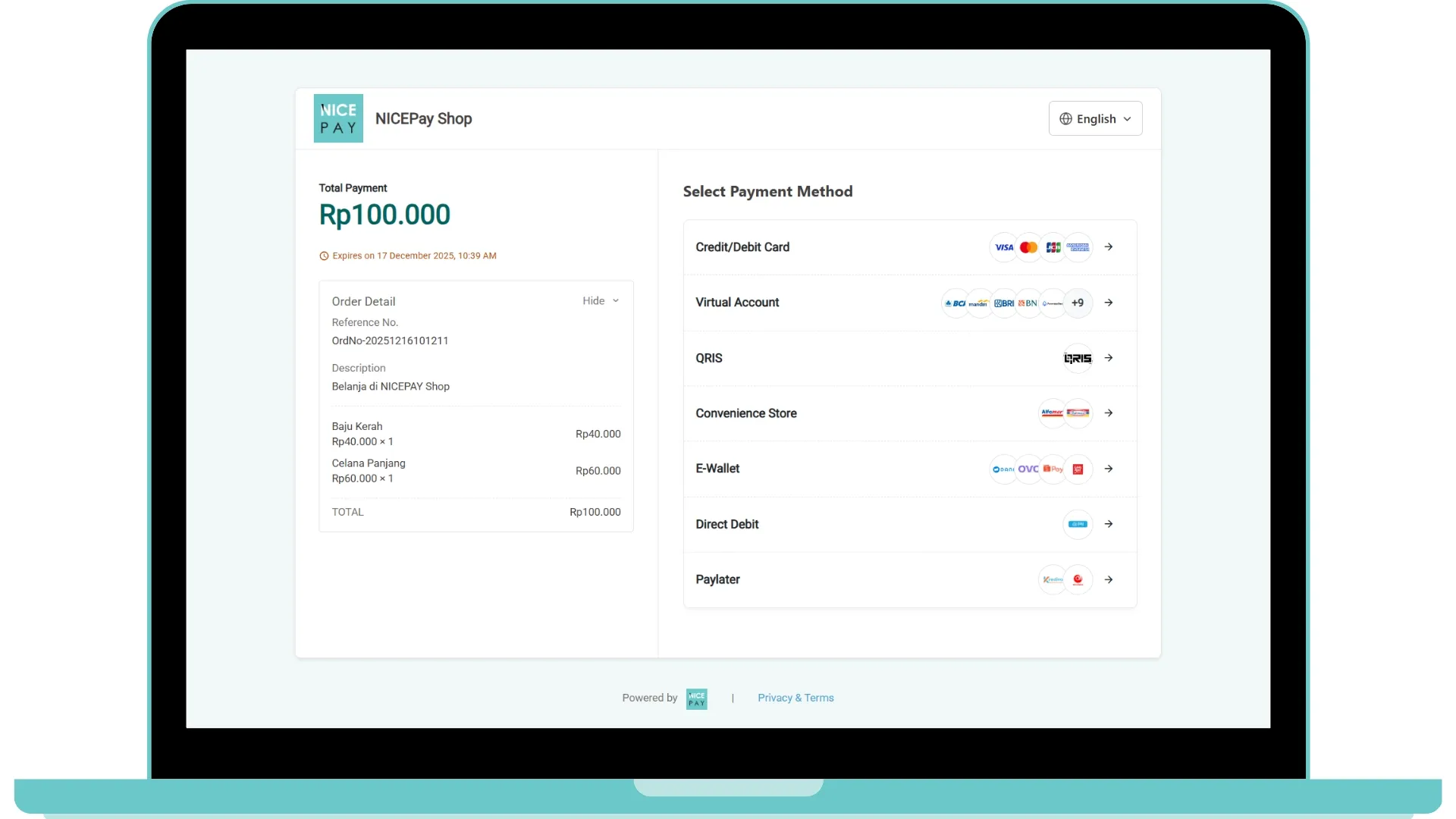
The image above is a payment sample with a Credit Card using NICEPAY Secure Payment Page.
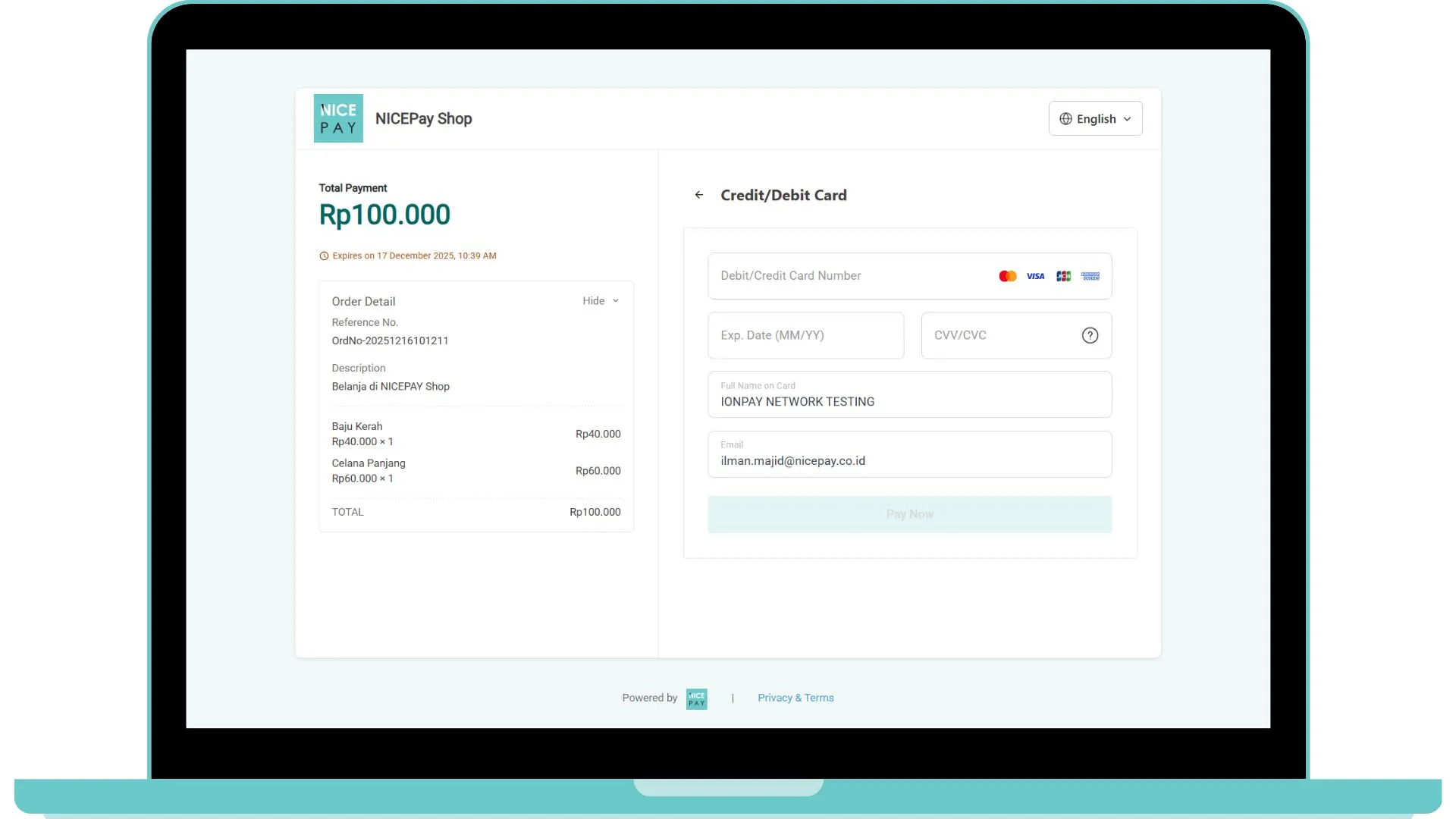
After the Customer selects the Credit Card method, the Customer will ask to input their card data. NICEPAY system will automatically recognize the type of Customer's BIN card like in the picture below, such as VISA or Mastercard, American Express, etc, later the cards will be different according to the card types being used.
After completing the card data input, Your Customer can continue the payment process.
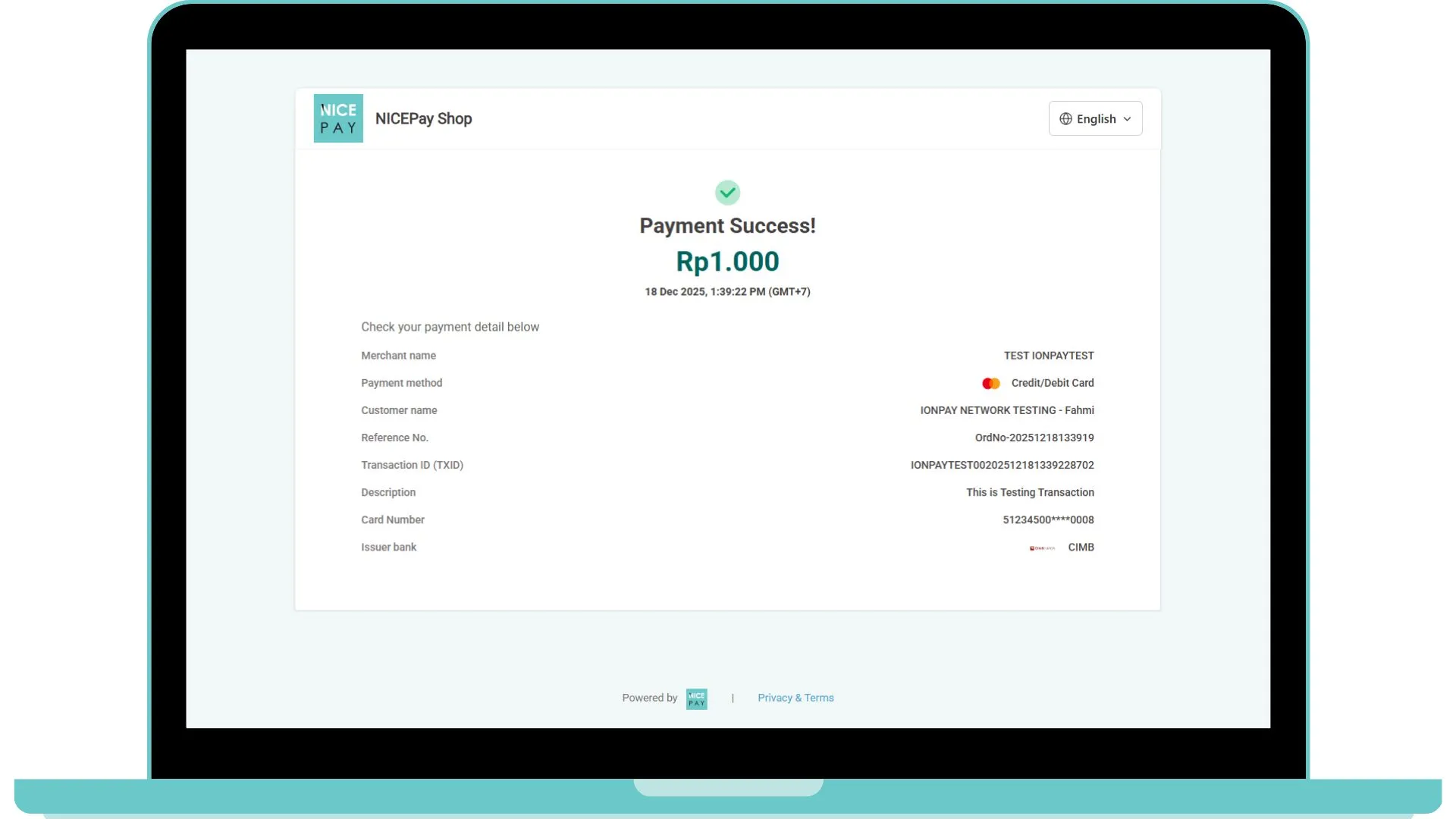
Then, the transaction will run. Once the transaction is successful, then the display of the NICEPAY payment page will appear as the image as follows.
Please visit the Payment - API Checkout page to know the next step regarding payment handling.
API Checkout Transaction Payment
API URL | /nicepay/redirect/v2/payment |
|---|---|
Request Method | Redirect-GET |
Header | Content-Type: application/Form-UrlEncoded |
The endpoint above can use for Credit Card payment methods with Full Payment.
Full Payment Credit Card - API Checkout (CallbackUrl)
On the Full Payment Credit Card, the Customer paid fully the nominal billed at once. The following is the details API used on Credit Card payment.
Request Parameter for Full Payment Credit Card - API Checkout (CallbackUrl)
Parameter | Type | Size | Description | Remark |
|---|---|---|---|---|
paymentURL Required | ANS | 14 | Payment URL | https://dev.nicepay.co.id/nicepay/redirect/v2/payment |
tXid Required | AN | 30 | Transaction ID | IONPAYTEST00202203211640309389 |
For Checkout Payment API, Credit Card payment method with Full Payment and Installment got the same response.
Response Parameter for Full Payment Credit Card - API Checkout (CallbackUrl)
Parameter | Type | Size | Description | Remark |
|---|---|---|---|---|
status | N | 1 | 0 | |
tXid | AN | 30 | Transaction ID | IONPAYTEST00202212201540174369 When Success |
referenceNo | AN | 40 | Merchant Order Number | ordNo20221220151243 When Success |
payMethod | N | 2 | 01 When Success | |
amt | N | 12 | Transaction Amount | 1000 When Success |
notaxAmt | N | 12 | Tax Fee Amount | 0 When Success |
vat | N | 12 | Value Added Tax (VAT) | 0 When Success |
fee | N | 12 | Service Fee | 0 When Success |
currency | A | 3 | Currency | IDR When Success |
goodsNm | AN | 100 | Goods Name | Goods+For+Testing+Credit+Card When Success |
billingNm | A | 100 | Billing Name | John+Doe When Success |
transDt | N | 8 | Transaction Date (YYYYMMDD) | 20221220 When Success |
transTm | N | 6 | Transaction Time (HH24MISS) | 154017 When Success |
authNo | N | 10 | Approval Number | 174300 When Success (Additional) |
issuBankCd | A | 4 | BMRI When Success | |
acquBankCd | A | 4 | BMRI When Success | |
issuBankNm | A | 255 | Issuing Bank Name | Mandiri When Success |
acquBankNm | A | 255 | Acquiring Bank Name | Mandiri When Success |
ccTransType | AN | 2 | Credit Card Transaction Type: 1: Normal 2: Recurring 3: Pre-Auth 4: Capture | 1 When Success |
cardNo | ANS | 20 | Card Number with Masking | 46161111****1111 When Success |
cardExpYymm | N | 4 | Card Expiration (YYMM) | 2707 When Success |
instmntType | N | 2 | 1 When Success | |
instmntMon | N | 2 | Installment Month 1: 1 Month/Full Payment, if instmntType: null/1 3: 3 Months 6: 6 Months 12: 12 Months | 1 When Success |
recurringToken | AN | 255 | Recurring Token | null When Success |
preauthToken | AN | 255 | Pre-Auth Token | null When Success |
matchCl | N | 1 | 1 When Success | |
merchantToken | AN | 255 | Merchant Token | 8f5b330a549c167b53b4b9fd5f2d2eba897a64235c1610524074ec59f8884e8a |
Sample Parameter for Full Payment Credit Card - API Checkout (CallbackUrl)
Request Parameter
curl -X GET "https://www.merchant.com/callbackUrl?ccTransType=1&fee=0&tXid=IONPAYTEST00202212201540174369&amt=1000¬axAmt=0&cardNo=46161111****1111&issuBankCd=BMRI&matchCl=1&preauthToken=null&cardExpYymm=2603&acquBankNm=Mandiri&payMethod=01¤cy=IDR&instmntMon=1&cc_trans_type=1&issuBankNm=Mandiri&merchantToken=dc1dd9e57ff6c4db341654ae31e623cab4d4d8057b2d0b58bef43ccb0da3b494&goodsNm=Goods+For+Testing+Credit+Card&referenceNo=ordNo20221220151243&authNo=174300&transTm=154017&cpGuaranteeableStatus=null&recurringToken=null&vat=0&instmntType=1&billingNm=John+Doe&acquBankCd=BMRI&transDt=20221220&status=0"Callback Parameter
status=0
tXid=IONPAYTEST00202212201540174369
referenceNo=ordNo20221220151243
payMethod=01
amt=1000
notaxAmt=0
vat=0
fee=0
currency=IDR
goodsNm=Goods+For+Testing+Credit+Card
billingNm=John+Doe
transDt=20221220
transTm=154017
authNo=174300
issuBankCd=BMRI
acquBankCd=BMRI
issuBankNm=Mandiri
acquBankNm=Mandiri
ccTransType=1
cardNo=46161111****1111
cardExpYymm=2707
instmntType=1
instmntMon=1
recurringToken=null
preauthToken=null
matchCl=1
merchantToken=8f5b330a549c167b53b4b9fd5f2d2eba897a64235c1610524074ec59f8884e8a
Note: Response parameter will be sent through callBackurl with Content-type: application/json and method: POST Parameter.
For the Payment integration process on Checkout API, the Response from Request received after performing Call Request API is a callback URL.
Callback Handling API Checkout Payment
The tXid won't be the same as the request hold. The capture process will reassure that the captured amount value doesn't exceed the funds owned.
When Your Callback already received callbackUrl, we recommended the Merchant to do the status verification using the Status Inquiry - API Checkout.
Callback Handling is very important to minimize the Fraud act, we highly recommend the Merchant to do the verification using Callback parameter.

"callbackUrl" : "https://www.merchant.com/callbackUrl/"