QRIS - API Checkout
About QRIS - API Checkout
This API uses by Merchant to requests a payment to the NICEPAY for QRIS payment method using Checkout API.
Process Flow
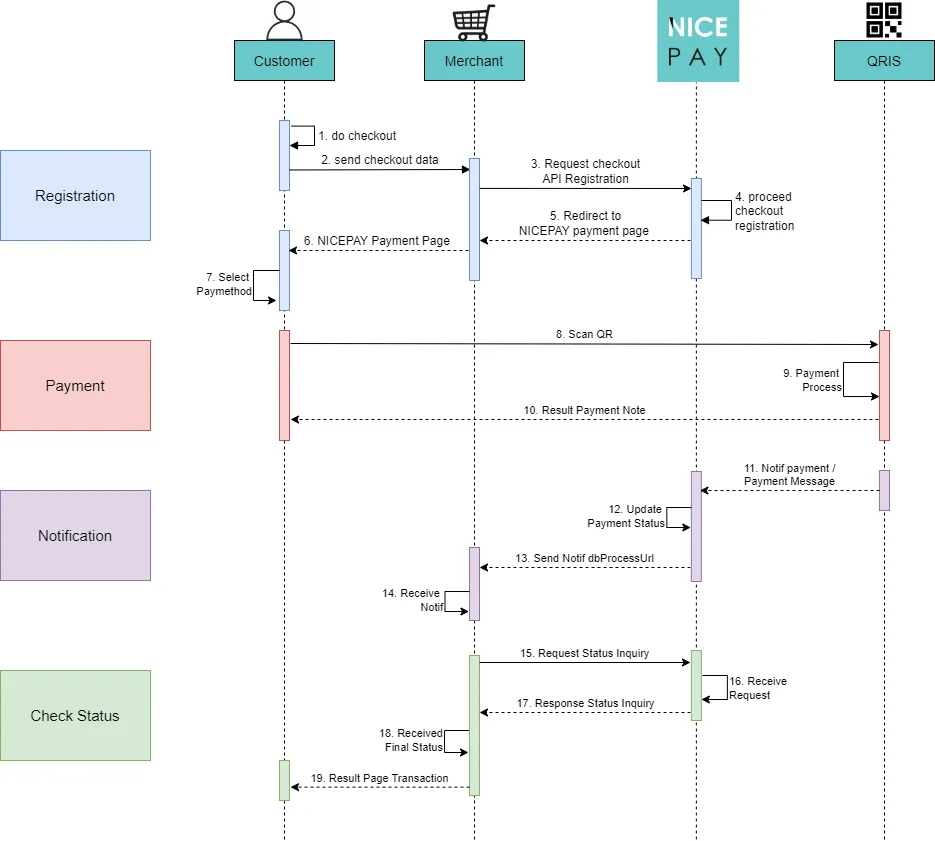
Steps description:
- The Customer does checkout.
- The Customer sends data checkout to Merchant.
- The Merchant sends request checkout using API Registration to NICEPAY.
- NICEPAY does checkout registration process.
- NICEPAY redirects Merchant to NICEPAY payment page.
- Merchant displays NICEPAY page to the Customer.
- The Customer chooses payment method.
- The Customer scan QR and send the process result to QRIS Partner.
- QRIS Partner does payment process.
- QRIS Partner sends payment note transaction result to the Customer.
- QRIS Partner sends notification or payment message to NICEPAY.
- NICEPAY updates payment status.
- NICEPAY sends dbProcessUrl notification to Merchant.
- Merchant receives notification.
- Merchant request status inquiry to NICEPAY.
- NICEPAY receives the request.
- NICEPAY sends status inquiry response to Merchant.
- Merchant receives final status.
- Merchant sends result page transaction to the Customer.
Before making an API calls for Transaction Payment, execute the Transaction Registration first.
NICEPAY Secure Payment Page
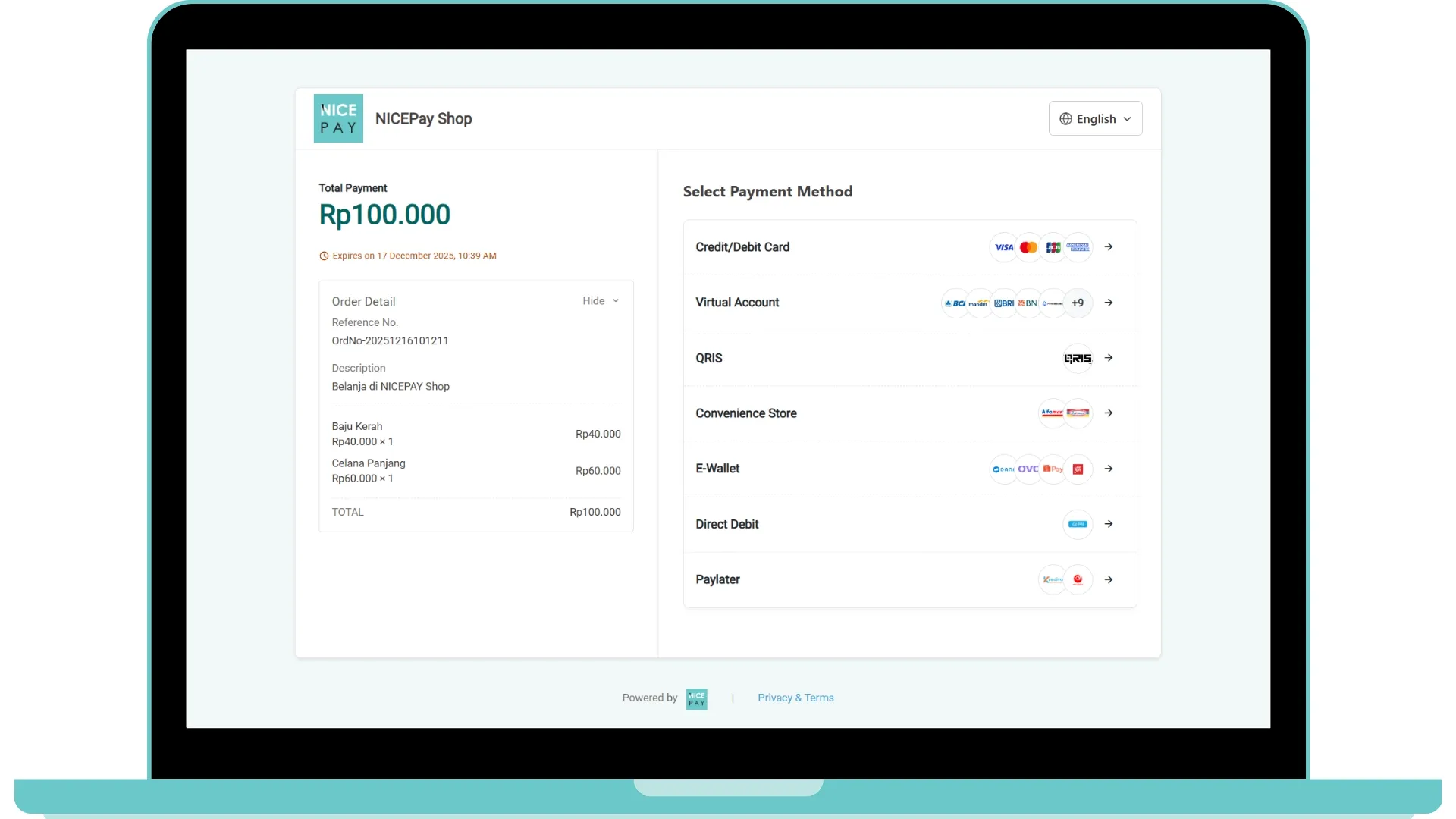
The image above is a sample of checkout payment procedures with the QRIS method using the NICEPAY Secure Payment Page.
The Customer can't go back to the Secure Payment page after choosing the QRIS payment method because the QR code transaction has already been generated successfully and is ongoing. If the payment method needs to be changed, the Merchant must re-create the transaction starting from the initial transaction.
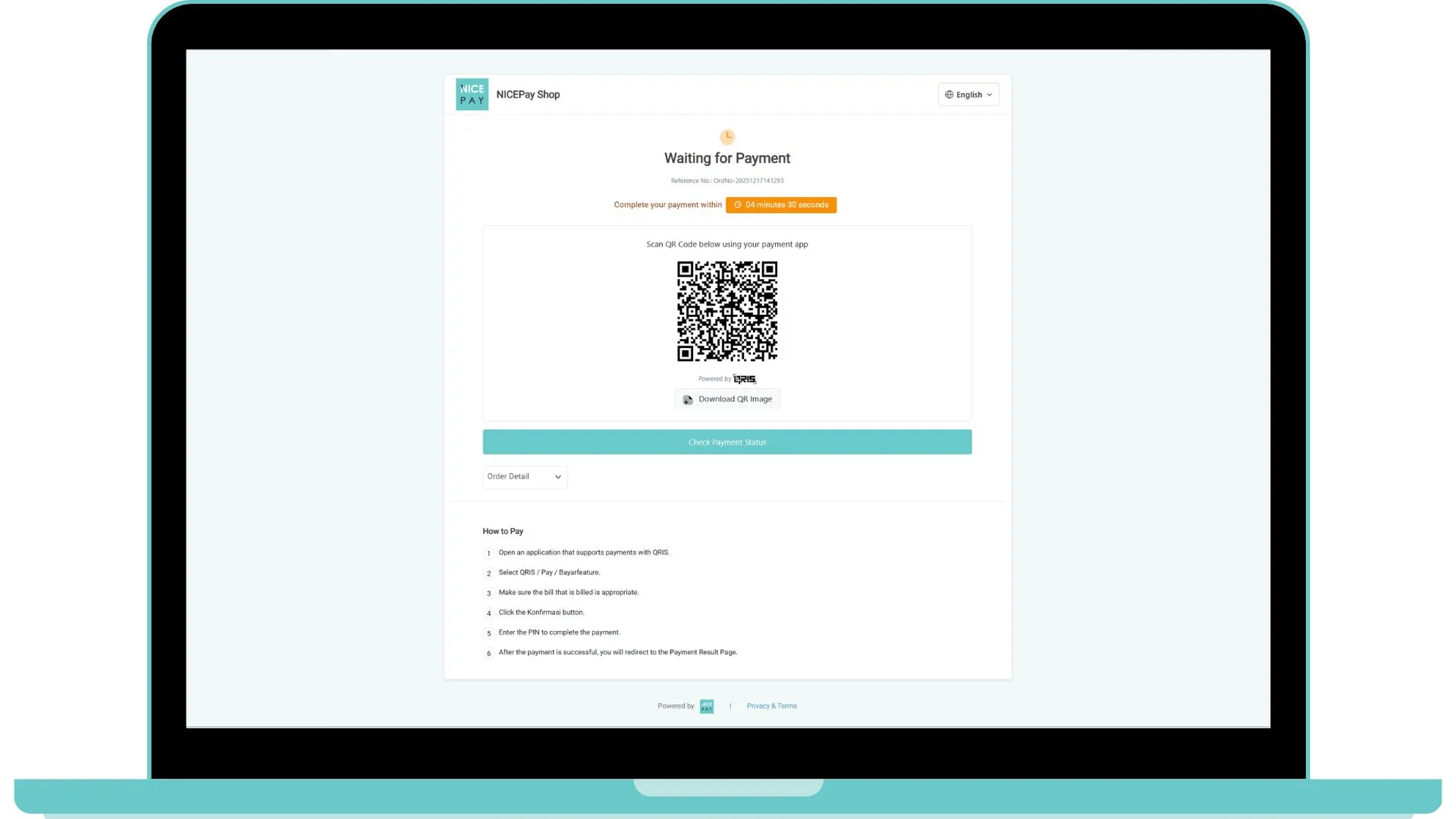
After choosing the QRIS method, the QR code will appear on the next page. The Customer can scan the code directly by following the QRIS Payment Guide or download the image firsthand through the Download QR Image button.
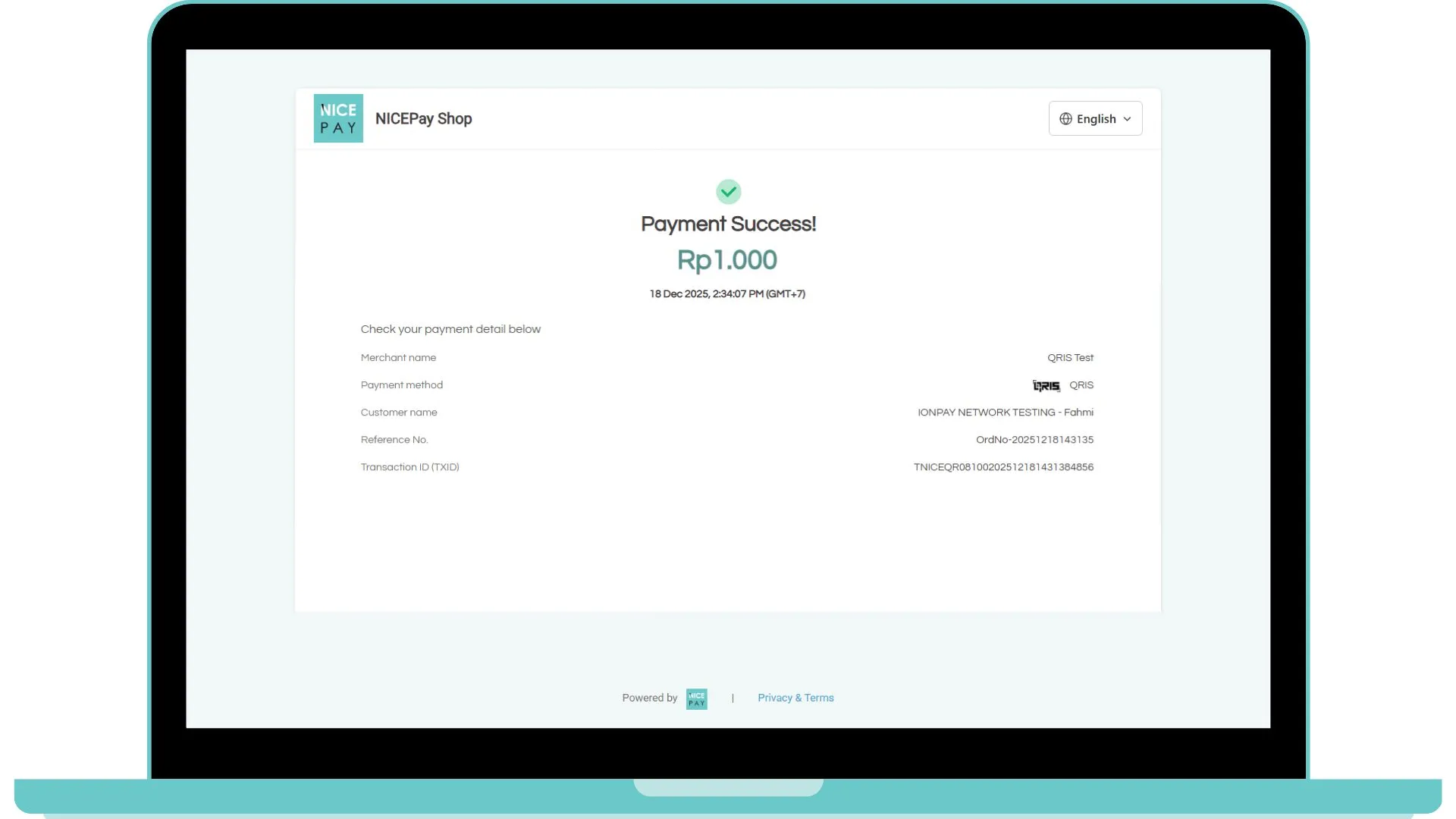
If the QR code hasn't been used on the transaction but has already expired, the Customer must repeat the generated QR code process by returning to the checkout page first.
API Checkout Transaction Payment
API url | /nicepay/redirect/v2/payment |
|---|---|
Request Method | Redirect-GET |
Header | Content-Type: application/Form-UrlEncoded |
Request Parameter for QRIS - API Checkout (CallbackUrl)
The following are Request Parameter lists for QRIS Payment API on Checkout API.
Parameter | Tipe | Ukuran | Deskripsi | Contoh / Catatan |
|---|---|---|---|---|
paymentURL Required | URL | 14 | Payment URL | |
tXid Required | AN | 30 | Transaction ID | IONPAYTEST00202103191252519205 |
Response Parameter for QRIS - API Checkout (CallbackUrl)
Parameter | Tipe | Ukuran | Deskripsi | Contoh / Catatan |
|---|---|---|---|---|
resultCd | N | 4 | Result Code | 0000 |
resultMsg | AN | 255 | Result Message: Error Code | Success |
tXid | AN | 30 | Transaction ID (Key from NICEPAY) | TESTTEST0300202008070951284276 When success |
referenceNo | ANS | 40 | Order Number | ord20200807090809 When success |
amount | N | 12 | Transaction Amount | 1000 When success |
transDt | N | 8 | Registration Date (YYYYMMDD) | 20200808 When success |
transTm | N | 6 | Registration Time (HH24MISS) | 120000 When success |
description | AN | 100 | Transaction Description | This is Testing Transaction When success |
authNo | N | 10 | Approval Number | 1234567890 When success – Only CC (Additional) |
recurringToken | AN | 255 | Recurring Token | 5b949971aea6d468bebef20fec7b067abde88e52a4520925cd28dfa840ce5abc When success – Only CC (Additional) |
cardNo | ANS | 20 | Card Number with Masking | 420192**2327 When success – Only CC |
acquBankCd | A | - | BMRI When success – Only CC | |
issuBankCd | A | - | OTHR When success – Only CC | |
vat | N | 12 | VAT Number | 0 When success , CC |
fee | N | 12 | Service Fee | 0 When success , CC |
notaxAmt | N | 12 | Tax Free Amount | 0 When success , CC |
bankCd | A | 4 | Bank Code | BMRI |
mitraCd | A | 4 | Mitra Code | OVOE When success Direct Debit, E-Wallet, Paylater |
bankVacctNo | N | 20 | VA Number | 447770956314286 When success – VA |
payNo | N | 20 | Payment number | 9041071059504308 When success – CVS |
currency | A | 3 | Currency | IDR When success – E-Wallet, Paylater |
goodsNm | AN | 100 | Goods name | Testing Transaction NICEPAY When success – E-Wallet, Paylater |
billingNm | A | 100 | Billing Name | IONPAY NETWORK TESTING When success – E-Wallet, Paylater |
payMethod | N | 2 | 03 When success – E-Wallet, Paylater |
Note: The response parameter will be sent through callbackUrl with Content-type: application/json and method: POST Parameter.
Sample Parameter for QRIS - API Checkout (CallbackUrl)
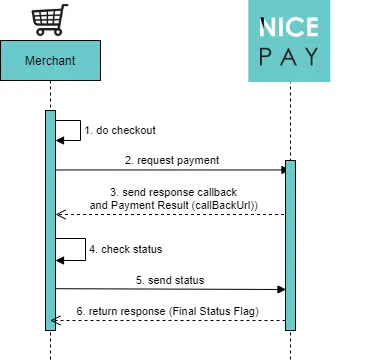
On the payment in Checkout, the response from the request that gets hit is the Callback URL.
Request Parameter
curl -X GET "https://www.merchant.com/callbackUrl?ccTransType=1&fee=0&tXid=IONPAYTEST00202212201540174369&amt=1000¬axAmt=0&cardNo=46161111****1111&issuBankCd=BMRI&matchCl=1&preauthToken=null&cardExpYymm=2603&acquBankNm=Mandiri&payMethod=01¤cy=IDR&instmntMon=1&cc_trans_type=1&issuBankNm=Mandiri&merchantToken=dc1dd9e57ff6c4db341654ae31e623cab4d4d8057b2d0b58bef43ccb0da3b494&goodsNm=Goods+For+Testing+Credit+Card&referenceNo=ordNo20221220151243&authNo=174300&transTm=154017&cpGuaranteeableStatus=null&recurringToken=null&vat=0&instmntType=1&billingNm=John+Doe&acquBankCd=BMRI&transDt=20221220&status=0"Callback Parameter
resultCd=0000
resultMsg=SUCCESS
tXid=IONPAYTEST00202212211103524783
referenceNo=ORDERKU345
payMethod=09
amt=12000
billingNm=John+Doe
authNo=150367
cardNo=62210082****0590
acquBankCd=ARTJ
issuBankCd=ARTJ
acquBankNm=Artajasa
issuBankNm=Artajasa
Callback Handling API Checkout Transaction Payment
When Your Callback already received callbackUrl, we recommended the Merchant to do the status verification using the Status Inquiry - API Checkout.
Callback Handling is very important to minimize the Fraud act, we highly recommend the Merchant to do the verification using Callback parameter.
https://merchant.com/callback-nicepay?resultCd=0000&resultMsg=SUCCESS&tXid=IONPAYTEST00202212211103524783&referenceNo=ORDERKU345&payMethod=09&amt=12000&billingNm=John+Doe&authNo=150367&cardNo=62210082****0590&acquBankCd=ARTJ&issuBankCd=ARTJ&acquBankNm=Artajasa&issuBankNm=Artajasa