QRIS Payment Flow
2 min
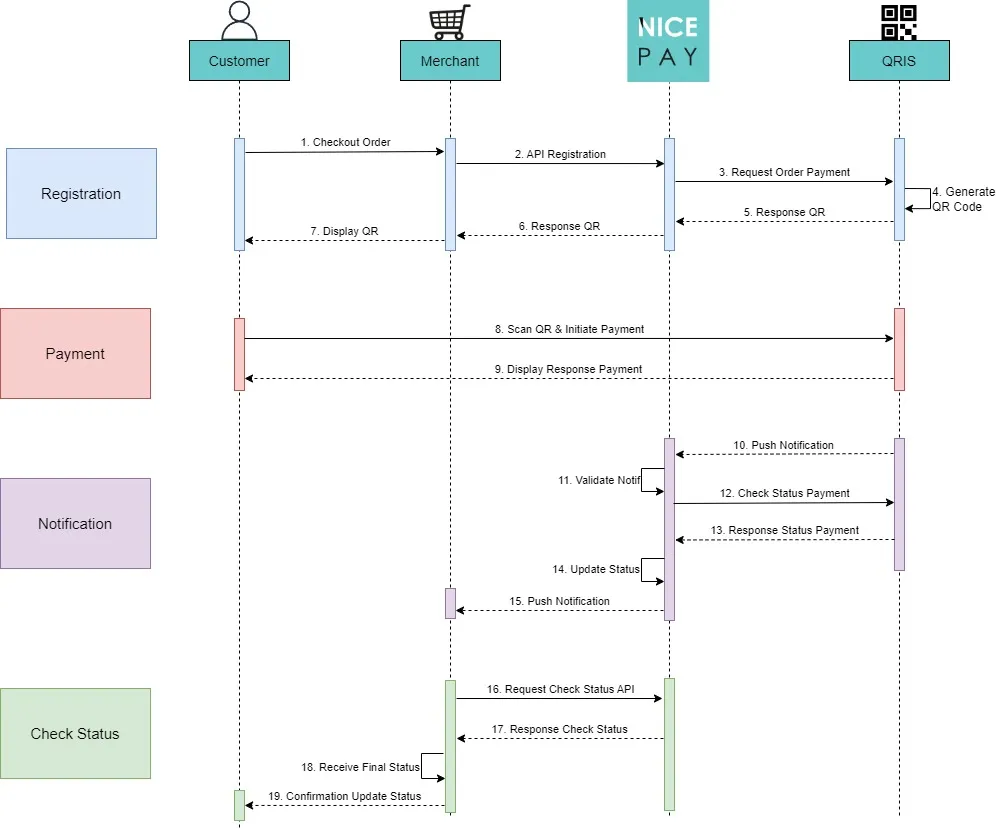
QRIS Payment Flow
Steps description:
- The Customer performs order checkout to the Merchant.
- The Merchant sends the Registration API to NICEPAY.
- NICEPAY requests payment order to QRIS Partner.
- QRIS Partner generates a QR code.
- QRIS Partner sends the QR response to NICEPAY.
- NICEPAY sends the QR response to the Merchant.
- The Merchant displays the QR to the Customer.
- The Customer scans the QR and makes payment to the QRIS Partner.
- QRIS Partner displays the payment response to the Customer.
- QRIS Partner sends push notifications to NICEPAY.
- NICEPAY validates the notification.
- NICEPAY sends a payment status check to the QRIS Partner.
- QRIS Partner sends a payment status response to NICEPAY.
- NICEPAY updated the status.
- NICEPAY sends push notifications to the Merchants.
- The Merchant submits a status check using the Status API to NICEPAY.
- NICEPAY sends a status check response to the Merchant.
- The Merchant receives the final status.
- The Merchant sends a status confirmation change to the business.
See also
Visit the QRIS Type page to find out the QRIS type that used on NICEPAY.
Visit the QRIS Integration & Testing page to find out how to perform integration and testing of the NICEPAY QRIS system.
Visit the QRIS Glossary page to find out the particular term used on QRIS.
Visit the QRIS FAQ page if you want to find out frequently asked questions related to QRIS.