E-Wallet Payment Flow
5 min
E-Wallet Partner Flow
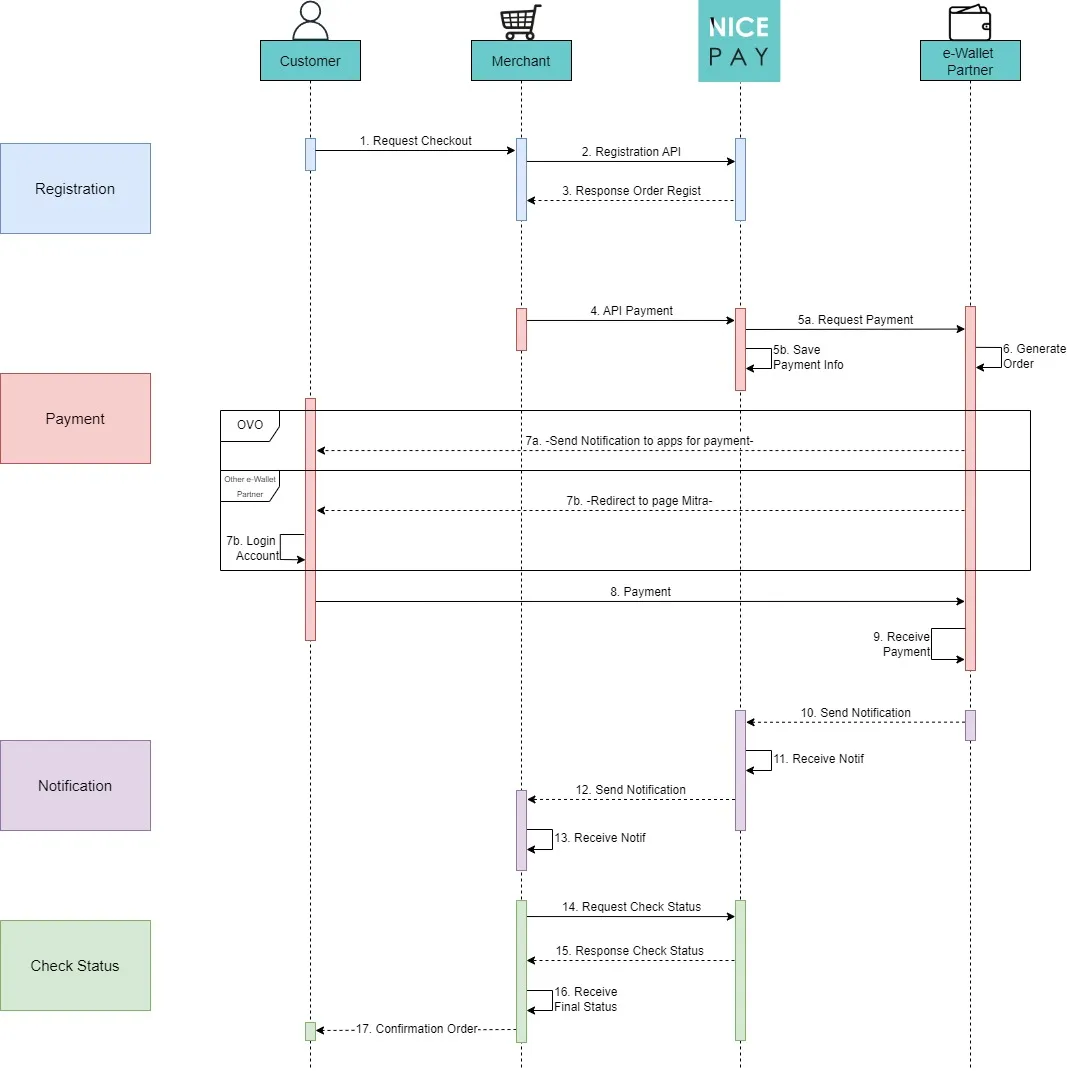
General E-Wallet Flow
Flow description after checkout order:
- The Customer requests a checkout to the Merchant.
- The Merchant sends a checkout request by using the Registration API to NICEPAY.
- NICEPAY sends a regist response order to the Merchant.
- The Merchant sends API Payment to NICEPAY.
- NICEPAY submits payments to E-Wallet Partners and stores payment information.
- The E-Wallet Partner generates the orders.
- At the time of payment:
- If the Customer uses the OVO E-Wallet, the E-Wallet Partner will send a notification to the relevant application to make a payment.
- If the Customer uses another E-Wallet (besides OVO and AstraPay), the E-Wallet Partner will redirect the Customer to the Partner's payment page.
- Then, the Customer must log in with the associated E-Wallet account before making the payment process.
- The Customer sends payments to the E-Wallet Partner.
- The E-Wallet Partner receives payment.
- The E-Wallet Partner sends a notification to NICEPAY.
- NICEPAY receives the notification.
- NICEPAY sends notifications to Merchants.
- The Merchant receives the notification.
- The Merchant submits a status check to NICEPAY.
- NICEPAY sends a response from a status check to the Merchant.
- Merchant receives the final status.
- The Merchant sends an order confirmation to the Customer.
AstraPay Flow
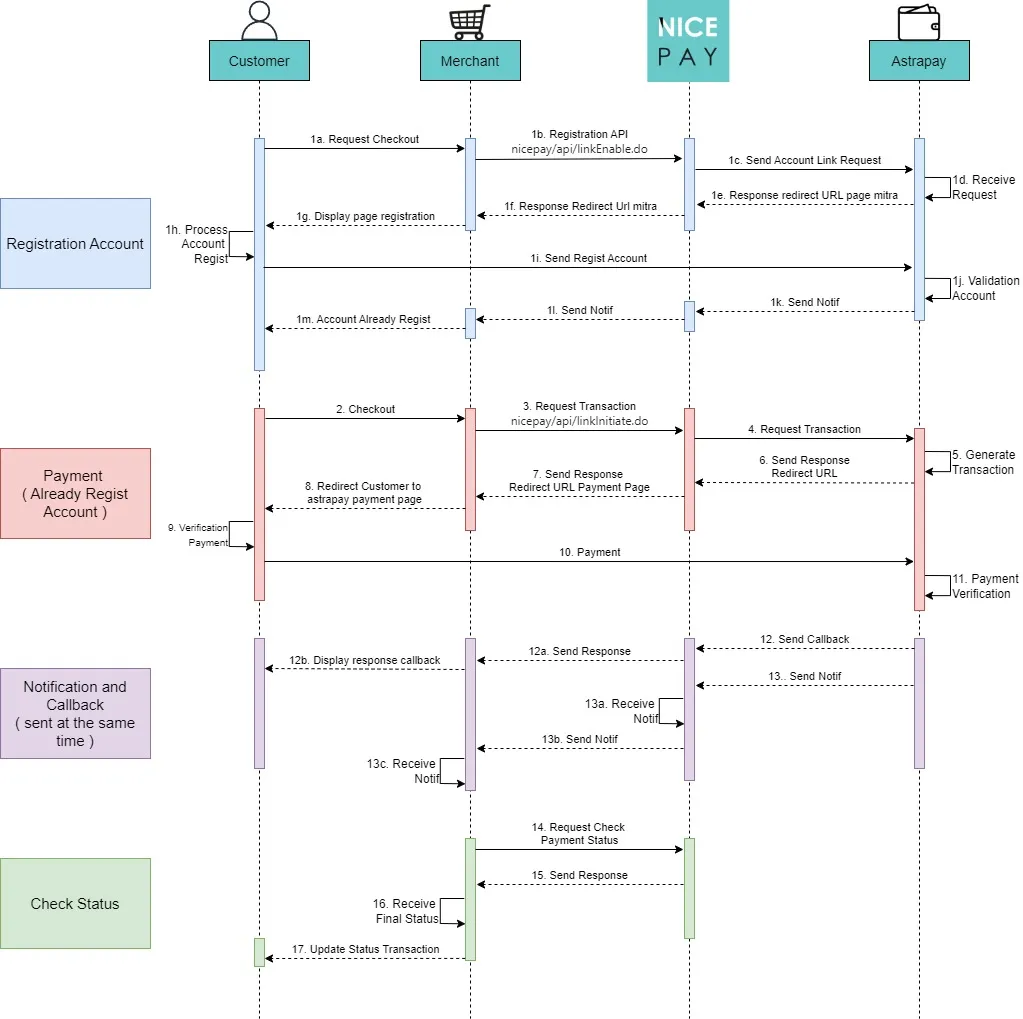
AstraPay E-Wallet Flow
Flow description when making a paymentt:
- If the Customer does not have an AstraPay account yet:
- The Customer requests a checkout to the Merchant.
- NICEPAY sends an account link request to AstraPay.
- AstraPay accepts submission.
- AstraPay sends NICEPAY a URL redirect response to the Partner's page.
- NICEPAY sends Merchant a Partner's URL redirect response.
- The Merchant displays the registration page to the Customer.
- The Customer completes the account registration process.
- The Customer sends an account registration to AstraPay.
- AstraPay performs account validation.
- AstraPay sends a notification to NICEPAY.
- NICEPAY sends notifications to the Merchants.
- The Merchant sends a notification informing that the account has been registered to the Customer.
- The Customer checkout to the Merchant.
- NICEPAY submits the transaction to AstraPay.
- AstraPay generates transactions.
- AstraPay sends a redirect URL response to NICEPAY.
- NICEPAY sends the payment page URL redirect response to the Merchant.
- The Merchant redirects the Customer to the AstraPay payment page.
- The verifies the payment.
- The Customer proceeds with payment to AstraPay.
- AstraPay performs payment verification.
- AstraPay sends a callback to NICEPAY.
- NICEPAY sends a response to the Merchant.
- The Merchant displays a callback response to the Customer.
- AstraPay sends a notification to NICEPAY.
- NICEPAY receives the notification.
- NICEPAY sends a notification to the Merchants.
- The Merchant receives the notification.
- The Merchant sends a request to check the transaction status by using Status API to NICEPAY.
- NICEPAY sends transaction status checking response to the Merchant.
- The Merchant receives the final status.
- The Merchant updates the transaction status to the Customer.
See also
Visit the E-Wallet Feature page to find out the transaction features on the E-Wallet.
Visit the E-Wallet Integration & Testing page to find out how to perform integration and testing of the NICEPAY E-Wallet system.
Visit the E-Wallet Glossary page to find out the particular term used on E-Wallet.
Visit the E-Wallet FAQ page if you want to find out frequently asked questions related to E-Wallet.